Co-op
Co-op maps (co_*) group players on one team to complete missions and fight against monsters in rounds. When the
team loses a round, the players respawn and try again until they finish the mission or run out of rounds and fail the
mission, at which point they will be taken to the next map.
Along the way, damaging monsters and healing players with the medikit earns you XP, and every level you gain makes you faster and gives you more health. Many monsters aim better and hit harder the more players are in the round. When the server allows it, one player can become the Game Master and place monsters, weapon drops and teleporters on the map.
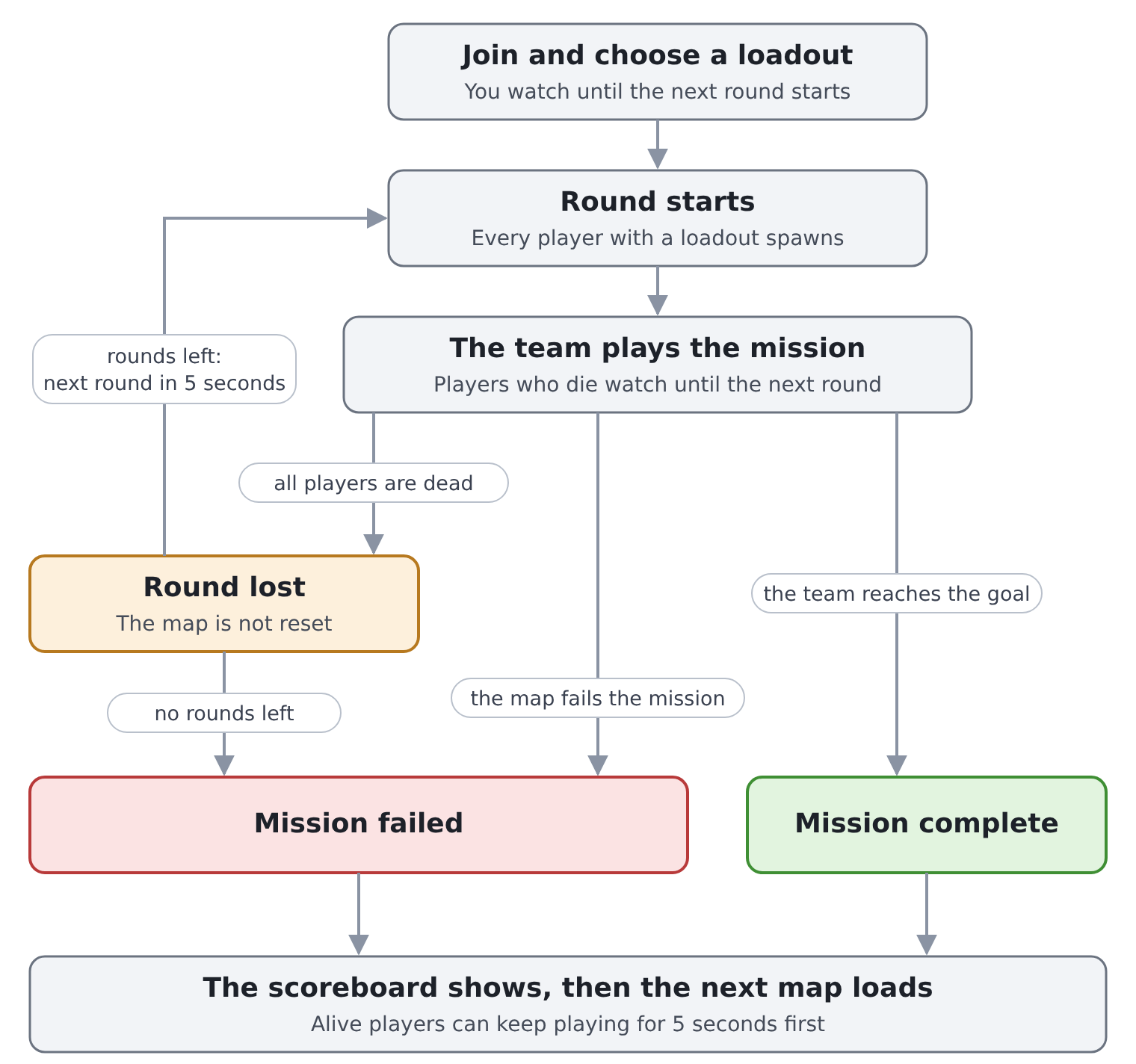
How a Co-op map runs, from joining to the next map
Joining
When you join a Co-op server, you see the server's message of the day, then the map briefing, and then the loadout window, where you choose a blade, a light weapon, a heavy weapon, a cyberware, an equipment item, your armor choice, and your agent choice (male or female). Once you choose your loadout, you spectate until the next round starts, so if a round is already in progress, you join when it ends.
Until you choose a loadout, the scoreboard lists you under No Loadout. You can open the map briefing again at any time with the map briefing key (Default: B).
Rounds
Round start
A round starts when at least one player has a loadout and no other player is still choosing one. The game checks this about every 20 seconds, and again as soon as the wait for a player runs out.
A player who hasn't chosen a loadout can hold up the round start for up to 45 seconds by default, counted from when they joined or last used the briefing or loadout windows. When that time runs out, the round starts without them, and they join the next round once they choose a loadout. A server can also make every round wait for every player (see Settings).
At the start of a round:
- Every player with a loadout spawns at a spawn point of the active spawn zone, with the weapons of their loadout
- The screen shows ROUND START
- Players can walk through each other for 15 seconds by default
The map is not reset between rounds: opened doors stay open, killed monsters stay dead, and players keep spawning in the spawn zone the map last moved them to. A map can put some of its entities back at each round start with round hooks.
Losing a round
A player who dies spectates until the next round. The team loses the round when one of these happens:
- Nobody is alive anymore
- The number of players who died reaches the server's share of the players who started the round, rounded down
By default the share is all of them, so the round is lost when every player of the round is dead. A server can set a smaller share, such as half, which with 5 players means the round is lost after 2 deaths, and with a share of 0, the round is lost when the first player dies.
After a lost round, the screen shows FAILED ROUND and the next round starts 5 seconds later. A player who goes to spectator mode, leaves the server or becomes the Game Master during a round stops counting for that round, as if they had never been in it.
Number of rounds
The mission fails when the team loses its last round. The number of rounds depends on the map and on the server's
easy mode setting (mp_easymode):
| The map has | Rounds with easy mode on (the default) | Rounds with easy mode off |
|---|---|---|
A max_round entity | 1.5 times its Maximum rounds value, rounded up. A value of 0 or less counts as 5 | Its Maximum rounds value. A value of 0 or less counts as 5 |
No max_round entity | 10 | 7 |
The scoreboard shows the current round and the number of rounds.
Mission end
The mission ends with a success or a failure:
| Result | Screen text | Cause |
|---|---|---|
| Success | SUCCESSFULL MISSION | A game_end is triggered, or a player touches a change_touch |
| Failure | FAILED MISSION | A mission_failed is triggered, or the team loses its last round |
Only the first result counts.
After the result, the players who are still alive can keep moving for 5 seconds by default. Then the scoreboard shows, and 10 seconds later by default the server loads the next map from the map cycle, whether the mission succeeded or failed. The time limit and the frag limit never end a Co-op map.
If the server sets a longer wait than 5 seconds (mp_missionendtime), the players who are still alive start
spectating where they stand 5 seconds after the result. This doesn't count as a death, so it adds no death, no penalty
and no kill feed entry.
Score, XP and levels
Score
In Co-op, the scoreboard shows your Level instead of a score. The score only appears in a server browser's player list, where it rises by 1 with every level-up and drops by 5 when you kill a teammate or yourself, but never below 0.
Killing a monster doesn't add to your score. XP is how you level up, and you earn it by dealing damage to monsters and by healing players with the medikit. See XP for more details.
XP
You earn XP in two ways:
- Damage to monsters: each point of damage you deal to a monster gives XP at that monster's rate, which the table below lists
- Healing with the medikit: each medikit heal that raises the health of a living player, yourself included, gives a random 500 to 1000 XP
| Monster | XP per point of damage |
|---|---|
Apache (monster_apache) | 100 |
Fed with heavy weapons (dark_grunt) | 10 |
Fed (monster_human_grunt, monster_grunt_hunter) | 8 |
Cop (monster_barney), Sectum (monster_dark) | 2 |
Imp (monster_imp, monster_imp_hunter), Assassin (monster_human_assassin) | 1.5 |
Demon Slave (monster_alien_slave, monster_hunter), Cyborg (monster_cyborg), Cyber Minotaur (monster_cyberminotor), Gargantua (monster_gargantua), Scientist (monster_scientist), Werewolf (monster_werewolf, monster_werewolf_hunter) | 1 |
Zombie Grunt (monster_zombie_grunt) | 0.4 |
Zombie (monster_zombie, monster_zombie_hunter) | 0.2 |
Other monsters give no XP.
Levels
You level up when your XP reaches 5000, or 7500 when the XP comes from the medikit, and your XP then starts again from 0. A single hit or heal gives at most one level.
At each level-up:
- The screen shows LEVEL UP
- You get a random 10 to 20 HP, up to your maximum health
- Your base speed rises by 5 right away
- Your spawn health rises by 2, from your next spawn on
- Your score rises by 1
When you die, the XP you gathered toward the next level is halved. Levels and XP last until you leave the server or the map changes, and the scoreboard shows each player's level and the total XP they earned on the map.
A map can also set, raise or lower a player's level and XP with a
game_player_settings entity.
Teamkills and suicides
Friendly fire is on by default, so players can hurt each other. If you kill a teammate, or kill yourself with your
own weapon or by typing kill in the console, you lose:
- 5 levels, which takes 25000 XP off your total on the scoreboard and lowers your base speed right away. Levels have no lower limit
- 25 spawn health, from your next spawn on, but your spawn health never goes below 10
Below level −40, your base speed stays capped at 100 regardless of how much lower your level goes. A server can also make a player with 5 or more teamkills on the map spawn with 3 health and no weapons (see Settings).
When a player kills a teammate, the kill feed shows the weapon icon in green.
Heavy weapon limits
Co-op maps have the following limits: 3 Vindico grenade launchers and 2 nuclear rocket launchers at any given time. A launcher becomes free again when the player who chose it leaves the server, chooses another loadout or enters persistent spectator mode. See Loadout for more details.
Monsters
Many monsters aim better and hit harder the more players are in the round, in four steps: 1 or 2 players, 3 or 4,
5 or 6, and 7 or more, and spectators and players waiting for a round don't count. The server also sets how hard
monsters hit, how well Feds and Cops aim, how much health monsters have, and how many monsters the
monstermaker entities make and how fast. See Settings for more
details.
Spectators
Players in spectator mode are not in the round, so they never count toward the round start, losing a round or how strong the monsters are. See Spectating for more details.
Game Master
When the server allows it, one player at a time can become the Game Master with the Game Master key (Default: K), alive or dead. The Game Master leaves the round without dying and flies around the map unseen and unhurt, and the game keeps their loadout for later. A player in persistent spectator mode can't become the Game Master.
The Game Master can:
- Place monsters, weapon and ammo drops, and teleporter pairs from a spawn window, which opens from the menus of the Game Master key
- Select monsters and send their own monsters to a spot, after a player or to hold a position
- Destroy the monsters they select, including those the map placed
- See the nearest players, and a health bar over every player and over their own monsters
- Watch players in every spectator mode
The Game Master's monsters fight the players like any other monster, and their kills show in the kill feed with the Game Master's name and the monster, for example "Sadako's Fed". For every two players their monsters kill, the Game Master's score rises by 1 and their screen shows LEVEL UP.
A teleporter pad sends a player to its exit pad, and players can shoot a pad to destroy the pair. On the scoreboard,
the Game Master is in the Game Master section, and their chat messages start with the *GM* prefix.
To stop, the Game Master chooses Leave GM Mode in the menus. They are then dead where they were, with no kill counted, and they join the next round with their loadout. Their teleporters disappear, but their monsters and drops stay. Game Master mode ends for everybody at the end of the mission, and for a single player when they leave the server.
Map entities
These entities control Co-op on a map. See each entity's page for its keys.
| Entity | Effect |
|---|---|
info_player_deathmatch | A spawn point of spawn zone 1 |
info_player_go2 … info_player_go5 | Spawn points of spawn zones 2 to 5 |
multispawn | When triggered, moves the active spawn zone to the next one, up to zone 5, or makes a named spawn set active. Players spawn there from the next round on |
max_round | Sets the number of rounds |
game_end | When triggered, ends the mission with a success |
change_touch | Ends the mission with a success when a player touches it |
mission_failed | When triggered, ends the mission with a failure |
The game also triggers the entities with these names, so a map can react to rounds and to the mission end. See Round hooks for more details.
| Name | When | Activator |
|---|---|---|
game_round_start | At the start of every round, after the players spawned | The world |
game_round_<N> | Right after game_round_start of round N, for example game_round_3 | The world |
game_round_end | At the end of every round | The world |
game_round_failed | When a round is lost, after game_round_end. The last round fires game_mission_failed instead | The world |
game_mission_success | When the mission succeeds, after the round's game_round_end | The world |
game_mission_failed | When the mission fails, after the round's game_round_end | The world |
game_playerdie | When a player dies | The player who died |
game_playerkill | When a player kills another player | The killer |
Settings
These server settings affect Co-op, and some of them apply to every game mode. You set them in server.cfg or in the server console. See
Server settings for more details.
| Cvar | Default | Effect |
|---|---|---|
mp_loadouttime | 45 | How many seconds a player without a loadout can hold up the round start. Setting it to 0 makes the round wait for every player |
mp_semiclip | 1 | Lets players walk through each other after a round starts. Setting it to 0 turns this off |
mp_semiclip_time | 15 | How many seconds players can walk through each other after a round starts |
mp_hardcore | 100 | Sets the percentage of the players alive at the round start who must die for the round to be lost. Setting it to 0 loses the round at the first death |
mp_easymode | 1 | Gives a map 1.5 times the rounds its max_round sets, or 10 rounds instead of 7 on a map without one. Setting it to 0 gives the map exactly the rounds its max_round sets, or 7 |
mp_missionendtime | 5 | How many seconds pass from the mission result to the scoreboard |
mp_chattime | 10 | How many seconds the scoreboard stays up before the next map loads |
mp_friendlyfire | 1 | Lets players hurt each other. Setting it to 0 turns this off |
mp_ban | 0 | Makes a player with 5 or more teamkills on the map spawn with 3 health and no weapons when set to 1 |
mp_juniorpowmonst, mp_junioracmar, mp_juniorpvmonst, mp_makermon, mp_speedmon | 1 | How hard monsters hit, how well Feds and Cops aim, how much health monsters have, and how many monsters the monster makers make and how fast |
mp_gmmode | 0 | Lets one player at a time become the Game Master when set to 1 |
Changes since 1.38
- A player who has not chosen a loadout, or go in Battle Royale, holds up the round start for at most 45 seconds. In SBO 1.38 the round waited for that player with no time limit
- Fixed an empty server counting rounds, so the first real round could be round 2 or later. With nobody on the server, the game started and counted a new round every 20 seconds
- Fixed a mission result reached between two rounds starting a new round first, which respawned everyone. The game acted on a mission result only during a round
- After a failed mission the server goes to the next map
- The "Reload map?" vote after a failed mission is gone. A failed mission now moves on to the next map
- Levels can go below -40, but speed stops dropping at -40
- The speed you lose for team kills and suicides applies right away
- The speed you gain from leveling up applies right away. In SBO 1.38 the new speed took effect only after your next weapon switch
- The spawn health penalty never takes you below 10 health. In SBO 1.38 a spawn health of 27 to 35 dropped to 2 to 10
- Players pass through each other for the first 15 seconds of a round
- Cops give XP for every hit, not only the killing one. In SBO 1.38 a Cop gave XP only for hits during its death animation
- The medikit gives XP only when it heals a player. In SBO 1.38 it also gave XP for hitting a wall, a monster or a body
- In Co-op, the scoreboard shows the level and XP of each player, and the round with the number of rounds
- Game Master mode is built into the game: on Co-op maps the Game Master can fly around, spawn monsters by tier, place weapon and ammo drops and teleporters, select monsters and give them orders, and see health bars over players and monsters
- Fixed
max_round1 and 2 being changed to 5. The game turned any value of 2 or less into 5 - The game triggers entities named
game_round_startandgame_round_endat each round start and end,game_round_<N>when round N starts,game_round_failedwhen a round is lost, andgame_mission_successorgame_mission_failedwhen the mission ends
See also
- Game modes - the three modes side by side
- Map names and spawns - how a map's name and spawn points set it up
- Round hooks - how a map reacts to rounds and the mission end
- Server settings - every server setting, with its default