calc_ entities: working out a value
The calc_ entities work out a value the moment another entity's locus key names
them, such as a point in front of the player, the direction from one place to another or the player's speed, and you
can chain them. Most entities act when you trigger them, but the calc_ entities work the other way round: they sit
in the map and do nothing until a key asks them for a value. Because their own keys are locus keys too, each one in a
chain works on the answer of the one before.
The first sections explain how a chain is worked out, followed by five setups you can build one step at a time. If
you haven't used locus keys yet, start with the Locus guide. See
Locus system for what each calc_ entity gives.
How a chain is worked out
When an entity needs a locus key's value, it asks the entity named there, which asks the entities named in its own keys, and so on down the chain. Nothing is stored on the way, so the game works out the whole chain again each time, from what the map looks like at that moment.
The whole chain is worked out for one entity, the activator of the trigger that started it, so *locus and
!activator in a calc_ entity mean the player who pressed the button, or the entity that touched the trigger.
Most calc_ keys that name an entity have *locus as their default, so if you leave them empty, they work on the
activator.
The one exception is calc_subvelocity, whose Scale factor and
Add offset are worked out for its Entity to use, not for the activator, so *locus in those two keys means
the entity it reads.
If any step of a chain fails, for example because an entity is missing or a number is divided by zero, the whole value fails, and the entity that asked does nothing that time.
With developer 1 set in the console, the console shows which value was bad.
Match the value types
Each calc_ entity gives one type of value: a position, a vector or a number. A key that wants a number must name
an entity that gives a number, and a key that wants a position or a vector must name an entity that gives one of
those. If you mix them up, the value doesn't fail, and you get what any plain entity gives instead: the entity's own
position, a velocity of 0 0 0, or the number 0, which makes this mistake hard to spot.
How to read the diagrams
In the diagrams, an arrow that points down (or to the right) is a trigger, and an arrow that points up (or to the left) is a value that goes back to the entity that asked for it. Read the values from the end of the chain back to the start, which is the order the chain gives its answers in.
Setup 1: an explosion in front of the player
When a player presses a button, an explosion goes off 200 units in front of their eyes, in the direction they look.
- Place a
func_button. Set its Target toboom - Place a
calc_subvelocity. Set its Name toahead - Leave Entity to use of
aheadat its default*locus - Set Value to calculate from to "View angles (player)"
- Set Scale factor to
200 - Place a
calc_position. Set its Name tospot - Leave Entity to use of
spotat*locus - Set Position to calculate to Eyes
- Set Add offset to
ahead - Place an
env_explosion. Set its Name toboom - Set the Position of
boomtospot - Set the flags Repeatable and No Damage, so you can test it safely
In game, the explosion asks spot for a position, and spot takes the player's eye position and adds the vector
from ahead: the direction the player looks, made 200 units long.
env_explosionboomcalc_positionspotAdd offset: ahead
calc_subvelocityaheadScale factor: 200
Setup 2: a field that pushes players away from its center
Players who walk into a room are pushed away from the middle of it, from whichever side they come in.
- Place an
info_targetin the middle of the room. Set its Name tocenter - Place a
calc_velocity_path. Set its Name toaway - Set Start position of
awaytocenter - Set Destination to
*locus - Leave Destination is at Position
- Set Length calculation to Normalize, so the vector is 1 unit long and only its direction counts
- Place a
trigger_pushthat fills the room. Set its Push direction toaway - Set Speed of push to
400
A trigger_push works out its locus keys for each entity that touches it, so *locus in away is the player who
is pushed. In game, the push points from center to that player, and Speed of push gives it its strength.
trigger_pushSpeed of push: 400
calc_velocity_pathawayDestination:
*locusLength calculation: Normalize
Setup 3: a speed trap
A player who moves through a corridor faster than 350 units per second gets a warning on their screen.
- Place a
trigger_multipleacross the corridor. Set its Target tocheck - Set Delay before reset of the trigger to
1 - Place a
calc_numfromvec. Set its Name tospeed - Leave Vector to use of
speedat*locus - Leave Vector value is at Velocity
- Set Number to get to Length
- Place a
trigger_compare. Set its Name tocheck - Set Base value of
checktospeed - Set Compare value to
350 - Set Comparison to pass to Greater
- Set Fire on comparison pass to
warn - Place a
game_text. Set its Name towarn - Set Message Text to
Slow down!
The player who touches the trigger is the activator, so speed reads that player's velocity and gives its length,
which is how fast they move. In game, only that player sees the text, because a game_text without the flag All
Players shows its text only to the activator.
trigger_comparecheckCompare value: 350
Comparison to pass: Greater
calc_numfromvecspeedSetup 4: a window that gets more solid as you get hurt
When a player presses a button, a glass window shows how much health they have lost. It is clear at full health and almost solid when they are nearly dead.
- Place a
func_wallfor the glass. Set its Name toglass - Set Render Mode of
glassto Texture - Set FX Amount of
glassto40 - Place a
func_button. Set its Target toshade - Place a
calc_ratio. Set its Name tohurt - Leave Based on number of
hurtat*locus - Set Transformation to "Reversed (1-X)"
- Place an
env_render. Set its Name toshade - Set Target of
shadetoglass - Set Render Mode to Texture
- Set FX Amount to
255 - Set FX Amount factor to
hurt
A player read as a number gives their health divided by their maximum health, so a player with 75 of their 100
health gives 0.75, and hurt turns that into 1 − 0.75 = 0.25. The env_render multiplies its FX Amount by that
factor, so in game the window gets an FX Amount of about 64. With a Fade Time set on the env_render, the window
changes smoothly.
env_rendershadeFX Amount: 255
FX Amount factor: hurt
calc_ratiohurtSetup 5: an explosion where the player looks
While a player stands on a platform, an explosion goes off every 2 seconds on the wall they look at. This setup
chains four calc_ entities to draw a line from the player's eyes, 4000 units long in the direction they look, which
stops at the first wall.
- Place a
trigger_multipleon the platform. Set its Target toboom5 - Set Delay before reset of the trigger to
2 - Place a
calc_position. Set its Name toeyes - Leave Entity to use of
eyesat*locus - Set Position to calculate to Eyes
- Place a
calc_subvelocity. Set its Name toaim - Set Value to calculate from to "View angles (player)"
- Set Scale factor to
4000 - Place a
calc_velocity_path. Set its Name toray - Set Start position of
raytoeyes - Set Destination to
aim - Set Destination is to Offset
- Set Line is blocked by to Walls
- Place a
calc_position. Set its Name tohit - Set Entity to use of
hittoeyes - Set Position to calculate to "Calc Position of the entity"
- Set Add offset to
ray - Place an
env_explosion. Set its Name toboom5 - Set the Position of
boom5tohit - Set the flag Repeatable
aim gives the view direction, 4000 units long. ray starts at eyes and goes along aim, but it stops where it
first hits a wall, so it is the vector from the eyes to that wall. hit asks eyes for its position and adds ray,
which gives the point on the wall. In game, the explosion goes off on that point.
env_explosionboom5calc_positionhitCalc Position of the entity
Add offset: ray
calc_velocity_pathrayDestination: aim
Line is blocked by: Walls
calc_subvelocityaimScale factor: 4000
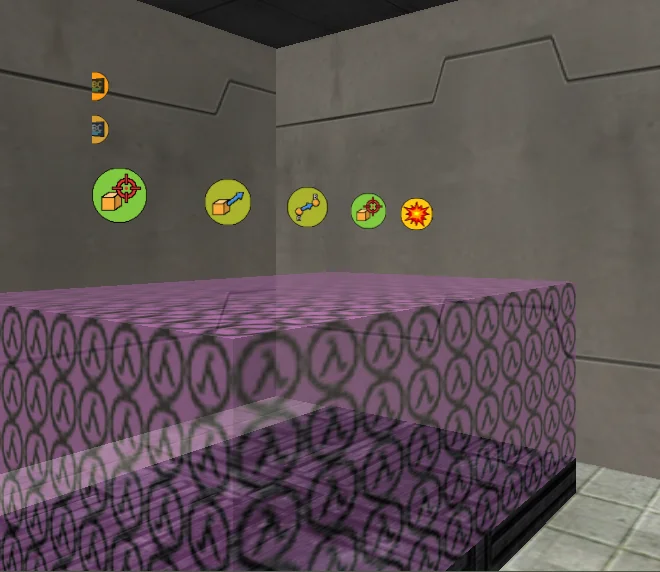
Left to right: eyes, aim, ray, hit and boom5 above the platform's trigger_multiple
An explosion at the center of the player's view
Tips
- Use
calc_eval_numberwhen you need to keep a result. It is the onecalc_entity that also does something when you trigger it: it works out its number and can store it in agame_number - Use
locus_variablewhen you need a value from the past, such as where a player was a moment ago, because a chain only sees the present - A
calc_ratioadds Offset by first and multiplies by Scale factor after that, so an offset of 1 and a factor of 2 turn 3 into 8, not 7
Further reading
- Locus guide - the idea behind locus keys, with six more setups
- Locus system - every rule, and the list of keys that take locus values
- Entity triggering -
!activatorand the other target keywords