Locus: passing a position or value between entities
Most entities have fixed settings: an explosion goes off where you put it, and a door opens as far as you set it to. The locus system lets some keys ask another entity for a value at the moment they need it, so an explosion can go off wherever the player is standing, or a button can check how much health the player has left.
Below are six small setups you can build one step at a time, each with what happens in game and a diagram of how the value travels between the entities. See Locus system for every rule, and the calc_ entities guide for longer chains.
The idea
A locus key holds either a fixed value or the name of an entity. If you put a name in it, the game asks that entity for its value every time it needs one, so the answer can change from one moment to the next.
In the editor, a locus key has a tag at the end of its name that tells you what kind of value it takes:
- [LP] - a position, which is a point in the world given as its X Y Z map coordinates, such as
128 0 64 - [LV] - a vector, which is a direction and an amount but not a place, such as
0 0 50for 50 units straight up - [LR] - a number, such as
5or0.5
A value that starts with a digit or a minus sign is a fixed value, and any other value is an entity name. The game
reads .5 as the name of an entity, so always write 0.5.
The activator
Every chain of triggers has an activator, which is the entity that started it. When a player presses a button, they become the activator of everything the button triggers, and of everything those entities trigger in turn.
In a locus key, !activator and *locus name the
activator, and *player names it only when it is a player. So one setup works for every player, because each
player who presses the button gets their own answer.
How to read the diagrams
In the diagrams, an arrow that points down (or to the right) is a trigger, and an arrow that points up (or to the left) is a value that goes back to the entity that asked for it. Each box shows the class name, the entity's name and the keys you set.
Setup 1: an explosion where the player stands
When a player presses a button, an explosion goes off where that player stands.
- Place a
func_button. Set its Target toboom - Place an
env_explosion. Set its Name toboom - Set the Position of
boomto!activator - Set the flag Repeatable on
boom, so it works more than once
In game, the button makes the player the activator, and the explosion asks the activator for its position. Each player who presses the button gets an explosion at their own position.
func_buttonenv_explosionboomSetup 2: an explosion above the player's head
This time the explosion goes off 50 units above the eyes of the player who presses the button. A
calc_position works out that point.
- Place a
func_button. Set its Target toboom - Place a
calc_position. Set its Name tooverhead - Leave Entity to use of
overheadat its default*locus, which is the activator - Set Position to calculate to Eyes
- Set Add offset to
0 0 50, which is 50 units up - Place an
env_explosion. Set its Name toboom - Set the Position of
boomtooverhead - Set the flag Repeatable on
boom
In game, the explosion asks overhead for a position, and overhead asks the player where their eyes are, adds 50
units up and gives the result to the explosion.
env_explosionboomcalc_positionoverhead*locusPosition to calculate: Eyes
Add offset: 0 0 50
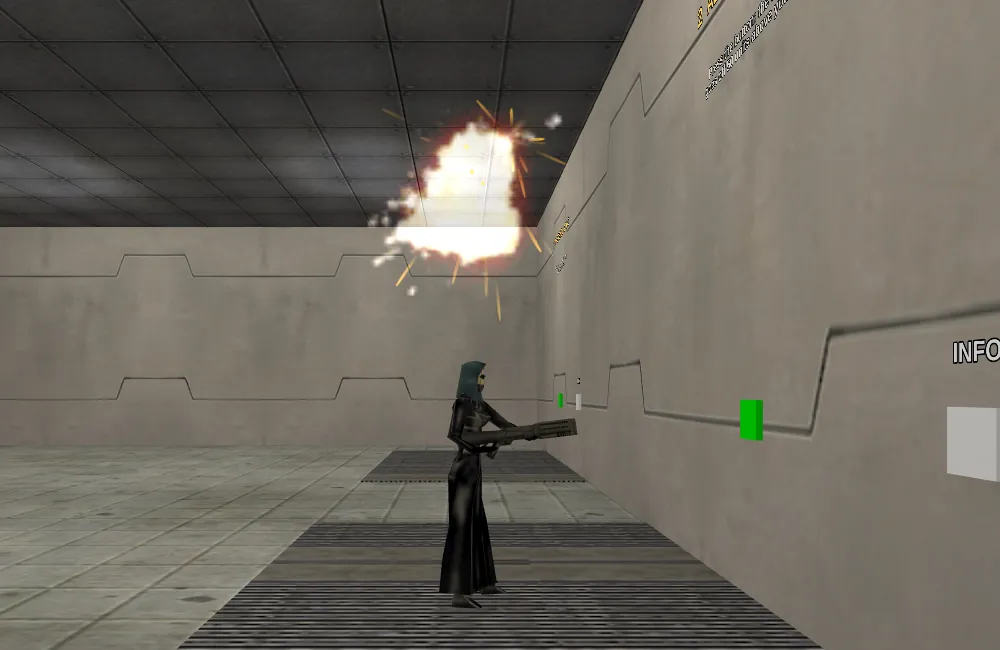
A fireball above the head of the player who pressed the button
The example map sdk/examples/maps/co_example_locus/ has setups 1 to 4, one bay each.
Setup 3: remember where a player came in
A locus_variable records a position when you trigger it and gives it back
later. This trap records where the last player came in, and a button sets off an explosion there.
- Place a
trigger_multipleacross the entrance. Set its Target tospot - Place a
locus_variable. Set its Name tospot - Leave the other keys of
spotat their defaults, so it records the activator's position - Place a
func_buttonfurther in. Set its Target toboom - Place an
env_explosion. Set its Name toboom - Set the Position of
boomtospot - Set the flag Repeatable on
boom
In game, each player who walks through the entrance triggers spot, which records their position at that moment.
When any player presses the button, the explosion goes off where the last player came in.
trigger_multiplelocus_variablespotenv_explosionboomlocus_variablespotSetup 4: a healing button that only works when you are hurt
A trigger_compare compares two numbers and triggers a target if the
comparison passes. A player read as a number gives their health divided by their maximum health, so a player with
40 of their 100 health gives 0.4.
- Place a
func_button. Set its Target tocheck - Place a
trigger_compare. Set its Name tocheck - Set Base value to
!activator - Set Compare value to
0.5 - Set Comparison to pass to Less
- Set Fire on comparison pass to
heal - Place a
game_player_hurt. Set its Name toheal - Set Damage To Apply to
-25, because a negative damage heals
In game, a player with less than 50 health who presses the button gets 25 health back. A player with 50 health or more gets nothing.
trigger_comparecheckCompare value: 0.5
Comparison to pass: Less
Setup 5: open a door after five kills
A game_number holds a number until you change it. Here a
calc_eval_number adds 1 to it at each kill, and a trigger_compare
opens the door at 5.
- Place a
func_door. Set its Name togate - Place a
game_number. Set its Name tokills - Place a
calc_eval_number. Set its Name tocount - Set First operand of
counttokills - Set Second operand to
1 - Set Operation to Add
- Set Store result in to
kills - Set Trigger after operation to
check - Place a
trigger_compare. Set its Name tocheck - Set Base value of
checktokills - Set Compare value to
5 - Set Comparison to pass to Greater or equal
- Set Fire on comparison pass to
gate - On each monster, set TriggerTarget to
count - On each monster, set Trigger Condition to Death
In game, each death triggers count. It reads kills, adds 1, stores the result back in kills and then triggers
check. When kills reaches 5, check opens the door.
calc_eval_numbercountStore result in: kills
game_numberkillscalc_eval_numbercounttrigger_comparecheckCompare value: 5
Fire on comparison pass: gate
game_numberkillsA game_number doesn't trigger anything when its number changes, which is why count triggers the check.
Setup 6: a beam that follows the player
A locus_beam makes a beam each time you trigger it. If one end is an entity,
the beam follows that entity while it moves.
- Place an
info_targetin the ceiling. Set its Name tozapper - Place a
func_button. Set its Target totether - Place a
locus_beam. Set its Name totether - Set Start & End are to "Position & Entity"
- Set Start at to
zapper - Leave End at at its default
*locus, which is the activator - Set Brightness to
255 - Set Color to
0 128 255 - Set Width to
20 - Set Duration to
3 - Set the flag End sparks
In game, a blue beam runs from the ceiling to the player who pressed the button. It follows that player for 3 seconds, and sparks fly where it touches them.
locus_beamtetherEnd at:
*locusinfo_targetzapper
A beam that follows the player who pressed the button
If nothing happens
If a key names an entity that doesn't exist, or a calc_ entity can't work out its value, the entity that asked
does nothing that time.
With developer 1 set in the console, the console shows which value was bad, such as
env_explosion "boom" has bad or missing [LP] value "spot".
Further reading
- Locus system - every rule, what each entity gives and the keys that take locus values
- calc_ entities guide - setups that chain
calc_entities - Entity triggering - names ending in
*,!activatorand!caller - Trigger modes - On, Off, Toggle and Set