color_correction_volume

A color_correction_volume changes the colors of the 3D view while the player's view is inside its brush, like the
entity of the same name in Source games. The look fades in as the view enters the brush and fades out as it leaves,
and it has the same look keys as a color_correction.
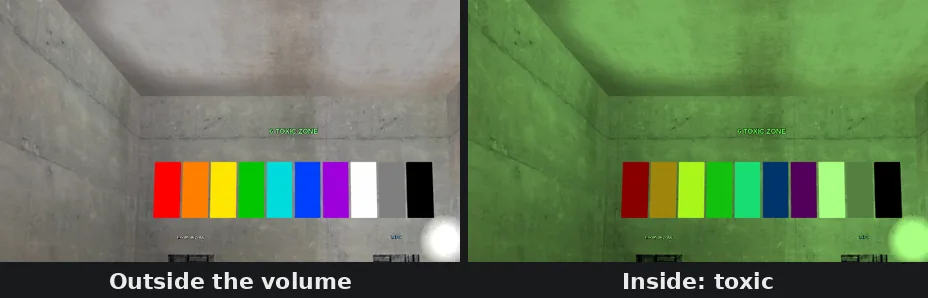
A color correction volume seen from outside and from inside
The volume uses the real shape of the brush, not only the box around it. The brush is never drawn and never blocks
anything, so you can give it any texture, such as AAATRIGGER.
Attributes
targetnameTriggering the entity turns the look on or off, as the use type says. See Common keys.
masterNames a master, and while the master is off, the look is off too.
StartDisabledSets whether the look is on when the map starts. A trigger turns it on or off by its use type: On turns it on, Off turns it off and Toggle switches it.
- No (0) - The look is on from the start
- Yes (1) - The look is off until you trigger it
No (0)filenameNames a color lookup table file that changes the colors of the view. It must be a .raw file in the Source format (32 by 32 by 32), which you can make with the in-game editor. A name without a folder, such as tealorange.raw, is looked for in gfx/colorcorrection/, and players download the file with the map. The game applies the simple keys below after the file, and you can't change the file while the map runs.
maxweightSets how strong the look is at full strength, from 0 for no change up to 1 for the full look. So 0.5 is halfway between the normal picture and the look.
1exclusiveSets whether this look pushes the other color corrections back while it is on.
- No (0) - The look mixes with the others
- Yes (1) - The look takes its share from every other color correction, so the others fade under it
No (0)saturationSets how strong the colors are: 1 is normal, 0 is black and white, and a value above 1 makes the colors stronger.
1contrastSets the contrast, where 1 is normal. A value above 1 makes dark parts darker and bright parts brighter, and a value below 1 makes the picture flatter.
1brightnessAdds this much to every color: 0 is normal, 0.1 makes the picture brighter and -0.1 makes it darker.
0gammaChanges the middle tones: 1 is normal, a value above 1 makes them brighter and a value below 1 makes them darker.
1tintcolorSets a color the picture is multiplied by, as strongly as Tint Amount says, so 255 200 140 gives sepia.
255 255 255tintamountSets how strong the tint is, from 0 for no tint up to 1 for the full Tint Color.
0fadeDurationSets how many seconds the look takes to fade in when the view enters the brush, and to fade out when it leaves. The same time is used when you turn the look on or off.
1Notes
- The volume's look mixes with other color corrections. See How the looks mix for more details
- Players can turn color correction off by typing
mat_colorcorrection 0in the console. See Settings for more details
See also
color_correction- a look around a point, or over the whole map- Color correction - lookup table files and how looks mix
env_fogzone- fog inside a brush
Changes since 1.38
color_correction_volumeis new in SBO 2.1.0