env_elight


An env_elight makes a light that only lights models, such as monsters, players, weapons and props, and never the
walls or the floor.
This is how it compares with an env_dlight:
env_dlight | env_elight | |
|---|---|---|
| Lights | Walls, floor and models, so you see a glow around it | Only models, so walls and floor stay as they are |
| Cost | More, because the engine works out the light on the walls and the floor it reaches again every frame | Less, because it only lights the models near it, at each corner of their shape |
| Reach | Its radius | Full brightness up to its radius, and in the dark you still see it at 6 to 7 times the radius. Walls don't block it |
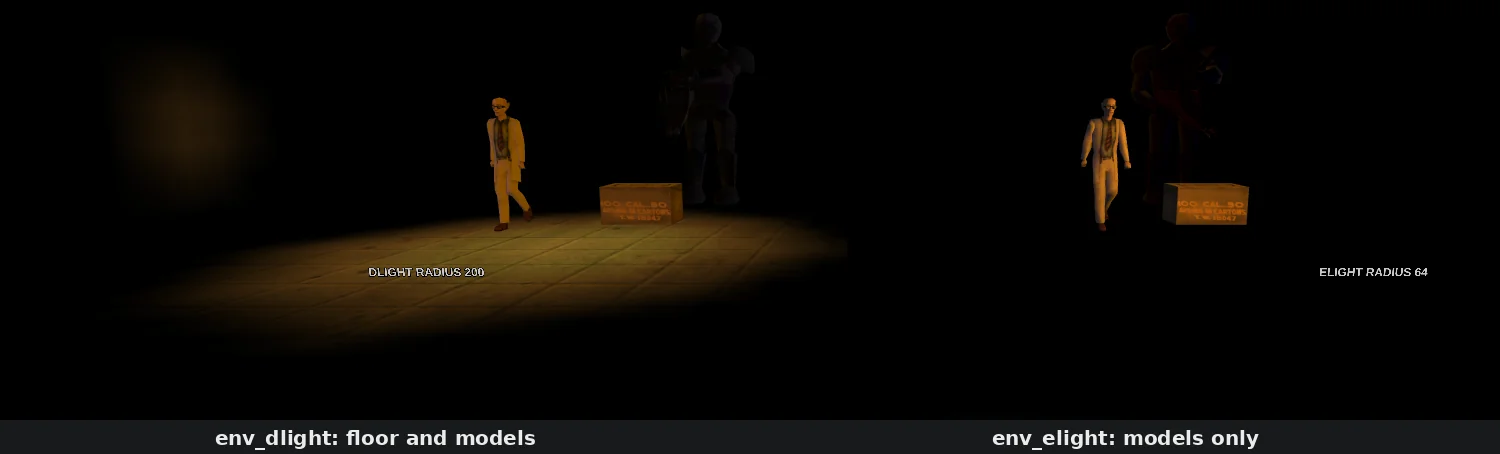
An env_dlight on the left and an env_elight on the right
The engine lights each model from the light baked into the map under it, plus up to four entity lights near it,
each from its own direction, so a model next to an env_elight gets a bright, colored side toward the light. The
light reaches every model in its range, players and monsters passing by too, and it shines through walls.
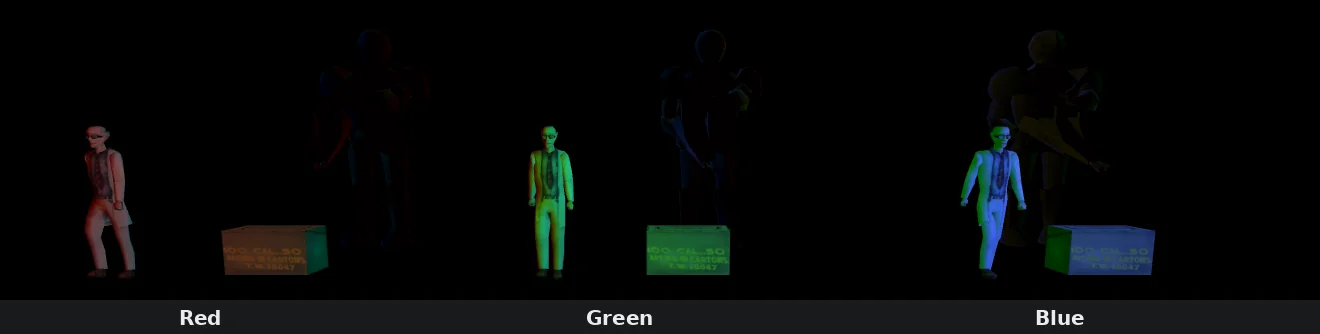
Scientists lit red, green and blue by three env_elight
Attributes
targetnameTriggering the entity switches the light on or off, as the use type says. Without a name, the light is on from the start of the map. See Common keys.
targetNames the entity the light sits on, and the light moves with it smoothly on every player's screen. When the entity is removed, the light goes out.
If you leave this key empty, the light stays at Position.
impulsePicks where on the followed model the light sits.
- None (0) - At the entity's own position, which for a monster is at its feet
- 1 - At the first attachment point of the model, a point the model maker placed, such as a monster's hand or gun
- 2 - At the second attachment point
- 3 - At the third attachment point
- 4 - At the fourth attachment point
None (0)messageSets where the light is when it follows no entity, in the same way as the Position of env_dlight.
If you leave this key empty, the light is at the env_elight itself.
rendercolorSets the color of the light, as red, green and blue from 0 up to 255.
255 255 255renderamtSets how far, in units from 0 up to 1023, the light has its full brightness. Past it, the light fades with the square of the distance, so in the dark a light with a radius of 48 still tints a model 270 units away.
64healthSets how many seconds the light stays on after it turns on, and 0 keeps it on until you switch it off.
0.0Flags
1Only onceThe entity is removed when its Duration ends
2Start onThe light is on from the start of the map
4Track position updatesWhile the light is on, the entity finds its Position again every 0.1 seconds, so the light follows a moving position
8Position is Locus EntityThe light sits on the entity named in Position and moves with it when that entity has a model you can see. On an entity without a model, such as an info_target, it stays where the entity was when the light turned on, unless you also set Track position updates
Lights that follow an entity
A yellow env_elight follows a moving func_train and lights the scientists that it passes
Notes
- A light inside a model only lights the inner faces of the model, so the model looks dark
- Each player's game has 64 entity lights, and muzzle flashes and other effects use them too. At most 32 of them can
be
env_elightlights at the same time, and a light whose place an effect took comes back within half a second - If Entity to follow names an entity that doesn't exist, the light stays off, and with
developer 1set in the console, the console reports it - If
trigger_changevalueortrigger_copyvaluechanges Radius, Light color or the attachment while the light is on, every player sees the change at once. See Changing keys
See also
env_dlight- lights the world and the modelsinfo_light_origin- where a placed model takes its light from- Lights on models - how models are lit
Changes since 1.38
env_elightis new in SBO 2.1.0