game_timer

A game_timer shows a countdown timer on the HUD, with a caption and a progress bar if you set them. It fires targets
when the time is up, when the warn time is reached, and when it pauses or resumes.
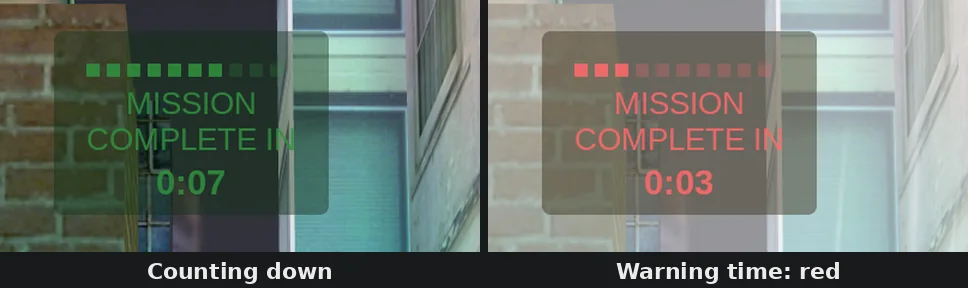
A countdown, and the same countdown in red in its warning time
A trigger with the use type On turns the timer on and starts it, Off turns it off and
hides it, and Toggle does one or the other. Only one timer shows on the HUD at a time, the first one turned on, in
the order of the map. A game_counter_set sets its time, with its New Value as the
seconds left.
Attributes
targetnameTriggering the entity turns the timer on or off. See Common keys.
timer_lengthSets the length of the countdown, in seconds.
0max_lengthSets the most time the timer can hold, in seconds, so setting or adding time never goes past it. With 0, there is no limit, and the progress bar, the elapsed time and the default warning use Timer Length.
0warn_timeSets how many seconds are left when the timer warns: it changes color and fires Target when warned. With -1, it is a quarter of the length.
-1StartDisabledSets whether the timer is off when the map starts.
- No (0) - The timer runs from the start of the map, unless it has Start Paused
- Yes (1) - The timer is off until you trigger it
Yes (1)start_pausedSets whether the timer waits when it is turned on.
- No (0) - The timer runs as soon as it is turned on
- Yes (1) - The timer shows the time, but doesn't run until it is resumed
No (0)show_time_remainingPicks which time the HUD shows.
- Show elapsed time (0) - The time gone, counting up from 0
- Show remaining time (1) - The time left, counting down
Show remaining time (1)disable_on_finishSets what the timer does when the time is up.
- No (0) - It stays on the HUD at 0
- Yes (1) - It turns off and leaves the HUD
Yes (1)show_in_hudSets whether players see the timer.
- No (0) - The timer is hidden, but it still runs and fires its targets
- Yes (1) - The timer shows on the HUD
Yes (1)progress_bar_maxSets how many segments the progress bar has, and -1 gives one for each second of the length, with 15 at most. With 0, there is no bar.
-1progress_bar_overrideSets how many segments are lit, and -1 shows the progress of the timer.
-1xSets where the timer is across the screen, from 0 for the left edge up to 1 for the right edge, and -1 centers it.
-1ySets where the timer is down the screen, from 0 for the top up to 1 for the bottom, and -1 puts it near the top.
-1timer_captionSets a text under the time, where \n starts a new line and #Token is a text from the game's language files.
caption_widthSets how wide the caption gets before it wraps to a new line, in pixels on a screen 1080 pixels high, scaled for other screens, and 0 means it never wraps.
260caption_linesSets the most lines of caption shown, from 1 up to 4, and text beyond them is cut off.
2targetNames the entities to trigger when the time is up.
warntargetNames the entities to trigger when the time left reaches Warn Time.
pausetargetNames the entities to trigger when the timer pauses, and also when it finishes or is turned off while it runs.
resumetargetNames the entities to trigger each time the timer starts or resumes running.
Changing a running timer
A trigger_changevalue changes any key of a running timer. It also takes these keys,
which only exist while the map runs:
time_remaining- Sets the time leftadd_timeandremove_time- Add or take away secondspaused- Pauses the timer with 1 and resumes it with 0
The timer fires its targets after it has its new state, so a target that triggers the timer again finds it updated.
See also
- HUD timer - how the timer looks and works
game_counter_set- sets the timetrigger_changevalue- changes the timer while it runs
Changes since 1.38
game_timeris new in SBO 2.0.0