info_waypoint

An info_waypoint puts a marker on the screen of every player, or of one player, to show them where a spot is. The
marker is an icon with an optional label and an optional distance in meters, in a color you choose, and it shows
through walls and floors. When the spot is off the screen, the marker sits on the edge of the screen with an arrow
pointing toward it.
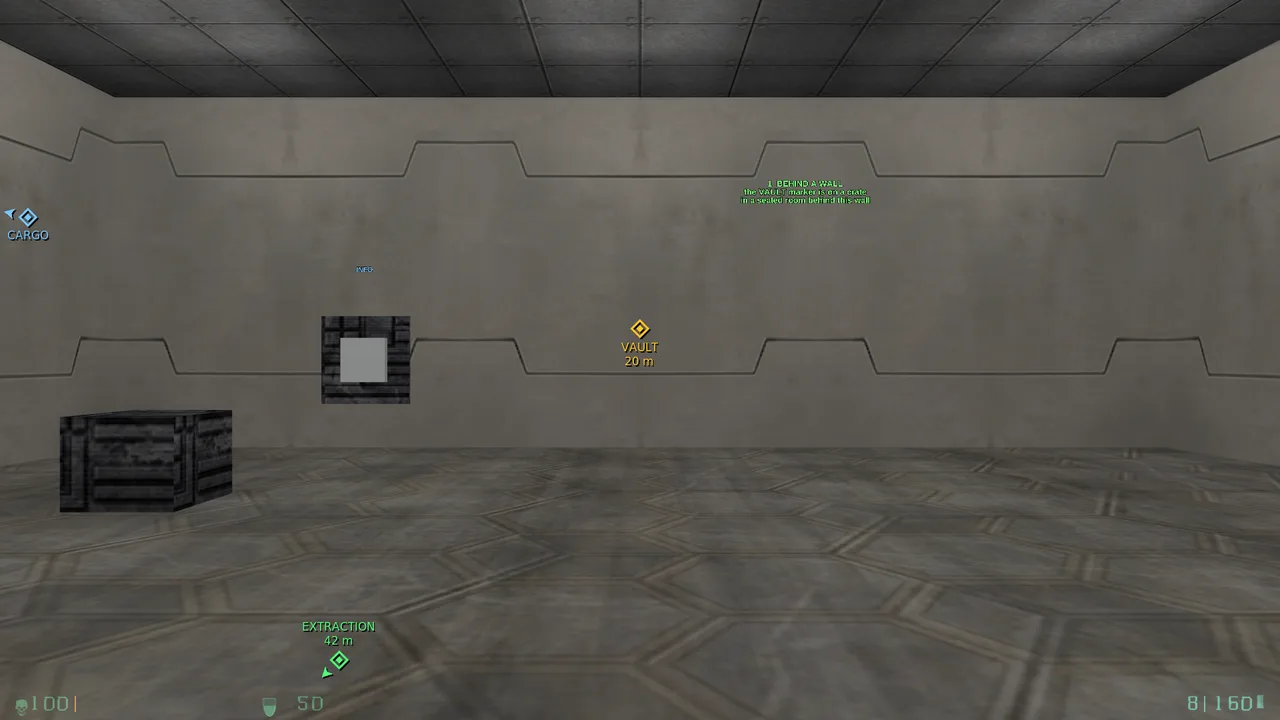
A marker seen through a wall, and two markers on the edges of the screen
Attributes
targetnameTriggering the entity switches the marker on or off, as the use type says. See Common keys.
modelSets the sprite the marker shows, which is always drawn at the same size on the screen, tinted with the Color. A white sprite takes the color best, and an additive sprite is added to the picture behind it.
If you leave this key empty, the marker is a diamond.
messageSets the text under the icon, up to 63 characters.
If you leave this key empty, the marker has no text.
rendercolorSets the color of the icon, the arrow and the text, as red, green and blue from 0 up to 255.
255 200 40targetNames an entity the marker moves with, such as a train, a monster or a crate. The marker keeps the distance from the middle of the entity that it has where you placed it, and if several entities have this name, it follows the first one. When the entity is removed, the marker stays where it was last, and when another entity takes the name or a trigger_changevalue names another entity, the marker moves onto that entity at the same distance.
If you leave this key empty, the marker stays where you placed it.
radiusSets how close, in units, a living player has to come for the marker to turn off. It turns off for everyone, or with Only the activator sees it only when that player comes this close. Players who are spectating never reach it. 0 means the marker never turns off this way.
0netnameNames the entities to trigger when a player reaches the marker, with that player as the activator.
min_rangeHides the marker from a player who is closer than this many units. 0 means no limit.
0max_rangeHides the marker and its edge arrow from a player who is farther than this many units. 0 means no limit.
0durationSets how many seconds the marker stays on each time it turns on, and 0 keeps it on until you turn it off. With Only the activator sees it, the time starts again when another player takes the marker over.
0round_resetSets whether the marker goes back to how it was when the map loaded at each new round.
- No (0) - The marker keeps its state from one round to the next
- Yes (1) - The marker is on or off as at map load, with its original Label, Color, Follow Entity and place
No (0)Flags
1Only the activator sees itOnly the player who triggers the marker sees it, for example as a hint for one player. The marker is off until a player triggers it, and when another player triggers it while it is on, it moves to that player
2Start onThe marker is on from the start of the map. Without this flag, it is off until you trigger it
4Show distanceShows the distance from the player to the marker in meters under the label
8No edge arrowThe marker shows only while its spot is in view, and it doesn't move to the edge of the screen with an arrow when the spot is off the screen
Notes
- A
trigger_changevaluecan change Label, Color, Follow Entity, Reached Radius, Hide Closer Than, Hide Farther Than and Duration while the map runs, and every player who sees the marker sees the change at once. Icon Sprite can't change while the map runs - The marker is part of the HUD, so it is hidden whenever the HUD is hidden, for example with
hud_draw 0typed in the console or by atrigger_camerawith Hide HUD and crosshair - The icon and the arrow grow with the HUD when a player turns on HUD scaling
- Markers in about the same direction move apart along the edge of the screen, so they don't cover each other
- Players who use the software renderer see the label and the distance, but not the icon or the arrow
- A Follow Entity that has no model, such as an
info_target, moves the marker in steps, about every half second - A marker on a monster stays on its body when it dies, until the body is removed, so turn the marker off from the monster's TriggerTarget with the Trigger Condition Death if it should go away then
- If the server doesn't have the Icon Sprite file, the marker is removed when the map starts, and a console line
says why when
developer 1is set in the console - Without Reset at round start, a marker keeps its state when a Co-op round restarts
- A spectator who watches a player sees that player's Only the activator sees it markers while watching from the player's eyes, in the main view or the small first-person view in the corner. Other spectators and players don't see them
- Hide Closer Than and Hide Farther Than are measured from each player's own view, so one player can see a marker that another player doesn't
See also
- Waypoints - how to lead players to an objective with a marker
trigger_objective- shows the mission objectives on the HUDenv_entity_glow- draws an outline or a halo around entities, also through walls
Changes since 1.38
info_waypointmarks a spot with an icon, a label and its distance in meters. It shows through walls and moves to the edge of the screen with an arrow when the spot is off the screen