Materials
Every texture has a material, which sets its footstep sounds, its bullet hit sounds and its bullet impact effects, such as decals, debris chips, dust puffs and sparks. The SBO textures already have materials. A small text file gives materials to the textures of your map, so players hear gravel under their feet and see wood chips where a bullet hits wood.
The materials room of co_sbo_showcase has nine floors: grass, gravel, dirt, snow, wood, carpet, tile, metal and
grate.
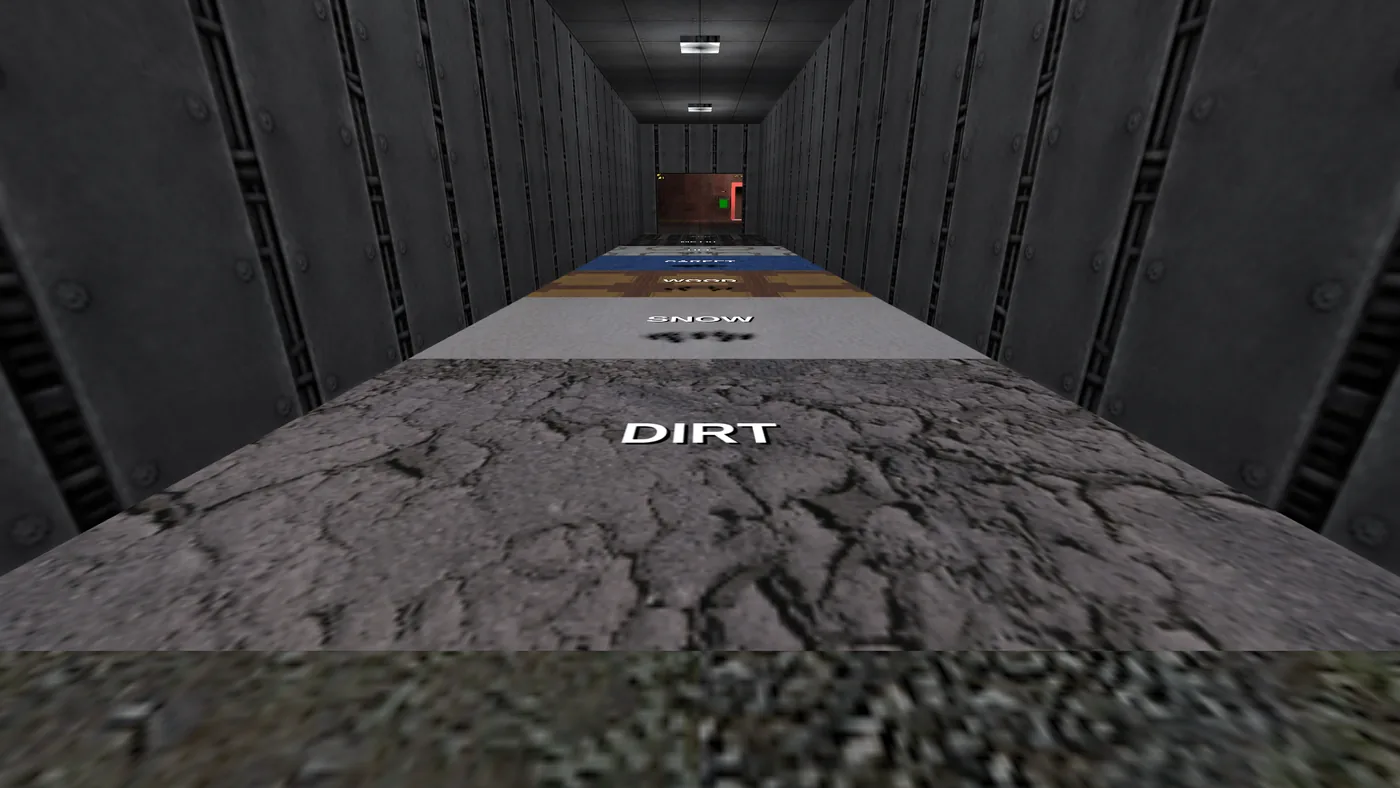
Material floors with bullet impact decals
Material letters
A material is a letter from A to Z, and a texture without a material counts as concrete:
| Letter | Material | Letter | Material |
|---|---|---|---|
| C | Concrete, the default | W | Wood |
| M | Metal | P | Computer |
| D | Dirt | Y | Glass |
| V | Vent | A | Grass |
| G | Grate | E | Carpet |
| T | Tile | R | Gravel |
| S | Slosh, which is shallow liquid | N | Snow |
| L | Light snow | Z | Mud |
| I | Tin | X | Paper |
| F | Flesh | K | Custom |
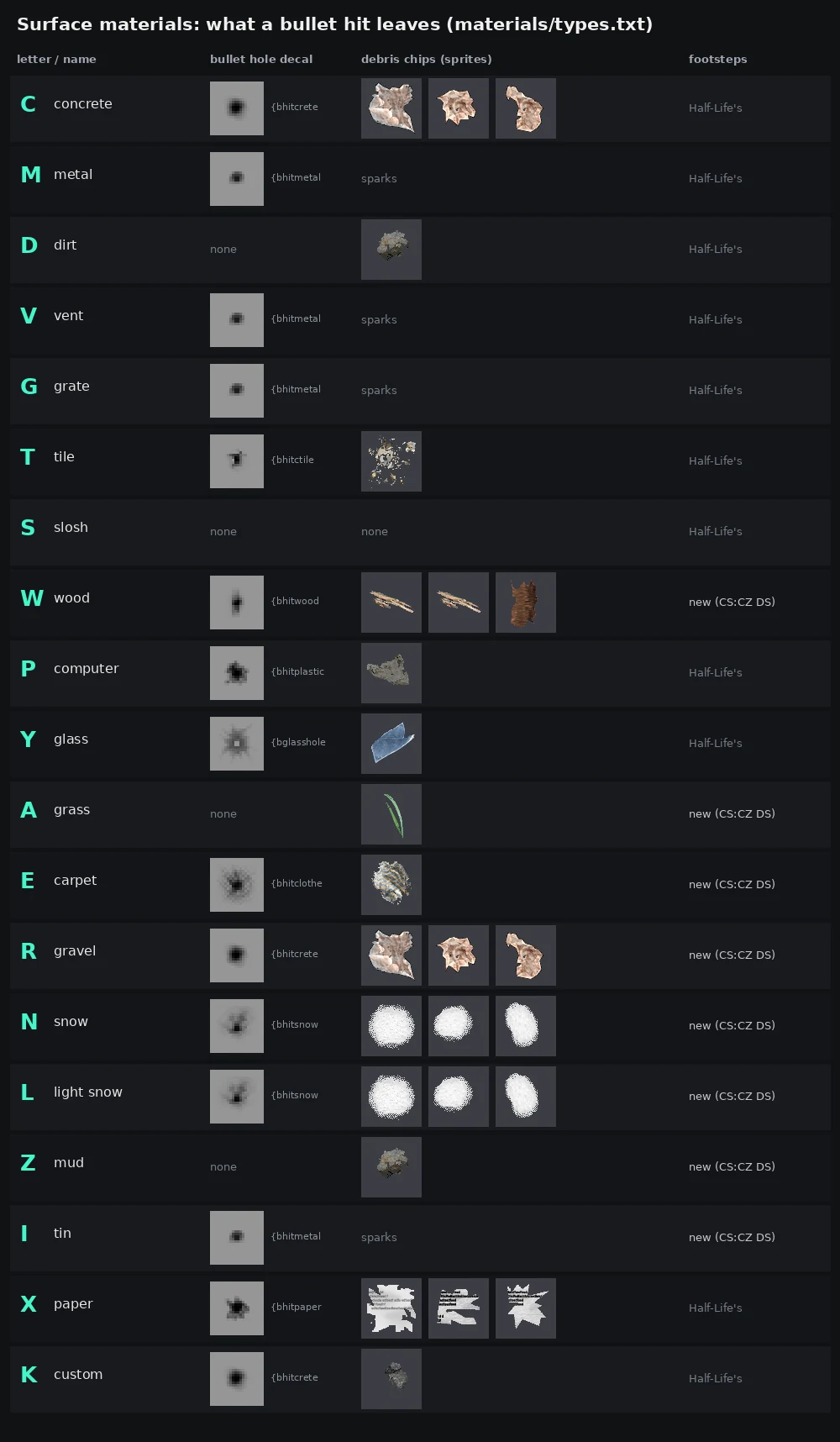
The decal, debris and footsteps of each material
The files
The letters and effects come from four kinds of file:
| File | What it holds | Where it applies |
|---|---|---|
sound/materials.txt | Half-Life's textures and their letters | Every map |
materials/textures.txt | The letters of the SBO textures, which are the textures in the anzymut, roux and co_escape WADs | Every map |
materials/types.txt | The sounds and impact effects of each letter | Every map |
| The materials file of the map | The textures, letters and effects of the map | That map |
The materials file of the map is the file that the worldspawn key Materials file
(materials_file) names. If that key is empty, it is materials/maps/<map>.txt, if that file exists.
Lookup order
A texture gets its letter from the last of these files that lists it:
sound/materials.txtmaterials/textures.txt- The materials file of the map
In the file of the map, its own lines win over the files that it includes. Inside one file, the first line for a
texture wins. The sounds and effects of a letter start with the built-in Half-Life values. Then
materials/types.txt changes them, and then the file of the map changes them. A block changes only the keys that it
names, and every other key keeps its value.
The game compares the full texture name first. If no line has the full name, a line that matches the first 12
characters counts. The prefixes -0, +0, {, ! and ~ aren't part of the name.
Texture lines
A texture line gives a letter to one texture: the letter, a space and then the texture name. This map file makes four textures of the map metal, grass, carpet and concrete:
// materials/maps/co_mymap.txt
M MYMETALFLOOR
A MYGRASS
E MYCARPET_RED
C 666PARQUET
You can write the letter in upper or lower case. Write the name without its {, !, +0 or ~ prefix. //
starts a comment, /* */ comments include whole lines, and the game skips a line that doesn't start with a letter.
The file of the map can also have these lines:
| Line | What it does |
|---|---|
#include <file> | Reads another materials file, with its texture lines and its blocks |
#types <file> | Reads a file of material, texture, ladder and wade blocks |
material <letter> { } | A material block, as below |
texture "<name>" { } | The impact effects of one texture |
Material blocks
A material block changes a letter, or gives a material to a letter that has none. A new letter starts with the
volumes and step times of concrete. This block makes K an alien floor with its own steps, hit sounds, green chips and
dust:
material K
{
	name "alien floor"
	step_right { "mymap/alien_step1.wav" "mymap/alien_step3.wav" }
	step_left { "mymap/alien_step2.wav" "mymap/alien_step4.wav" }
	hit { "mymap/alien_hit1.wav" "mymap/alien_hit2.wav" }
	fx_debris { "sprites/mymap/alien_chip.spr" }
	fx_smoke 1  fx_smoke_color 60 140 60
	fx_decal "{bhitcrete"
}
A block takes these sound and step keys:
| Key | What it sets |
|---|---|
name | The name of the material |
step_right, step_left | Up to 6 sounds each, and each step plays one of them at random |
walk_volume, run_volume | How loud the steps are, from 0 to 1 |
walk_time, run_time | How many milliseconds until the next step, from 50 to 5000 |
step_skip | If you set 1, every fourth step is silent |
hit | Up to 6 hit sounds |
hit_volume | How loud the hit sounds are, from 0 to 1 |
hit_volume_bar | How loud a melee hit on it is, from 0 to 1 |
hit_attenuation | How fast the hit sound fades with distance, from 0 to 4, where 0.8 is normal |
hit_sparks | If you set 1, about half of the bullet and melee hits on it make sparks and a spark sound, as on computers |
A letter without steps sounds like concrete when you walk on it. A letter without hit sounds sounds like concrete
when you hit it. Steps need both lists, step_right and step_left. A ladder block and a wade block also take
the step keys, and they set the sounds of ladders and of walking through water.
These keys set the impact effects:
| Key | What it sets |
|---|---|
fx_debris | Up to 4 sprites, and each chip uses one of them at random |
fx_debris_count | How many chips a hit makes, from 0 for none to 8, and each hit adds 0 to 2 more |
fx_debris_size | The size of the chips, from 0.5 to 32 |
fx_debris_life | How many seconds a chip lasts, from 0.1 to 30 |
fx_debris_speed | A factor for the speed of the chips, from 0 to 4 |
fx_debris_brightness | How bright the chips are, from 0 to 255 |
fx_debris_additive | If you set 1, the game draws the chips additive, so they glow |
fx_debris_color | The color of the chips, as R G B |
fx_debris_gravity | A factor for the gravity on the chips, from -4 to 4 |
fx_debris_damp_time | How many seconds until the chips slow down, from 0 to 10 |
fx_debris_damp_speed | A factor for the speed after that time, from 0 to 4 |
fx_debris_afterdamp_gravity | A factor for the gravity after that time, from -4 to 4 |
fx_smoke | If you set 1, hits make dust puffs |
fx_smoke_color | The color of the puffs, as R G B |
fx_sparks | If you set 1, hits make sparks and a flash of light |
fx_decal | A decal name from decals.wad, up to 15 characters, or none for no decal |
fx_ricochet | Up to 6 ricochet sounds |
An fx_ key gives the letter its own impact effect. A letter without fx_ keys shows the bullet impact of
Half-Life, and flesh (F) has no impact effect.
Texture blocks
A texture block gives one texture its own impact effects, separate from its letter, and it takes the fx_ keys.
This block makes sparks on a glass texture, without a decal:
texture "{MYGLASS" { fx_sparks 1 fx_decal none }
Values and errors
Numbers are plain decimals, and the game changes a number that is out of range to the nearest limit. Sound paths
start from sound/ and end in .wav. File paths start from the game folder and end in .txt. The game skips a key
that it doesn't know, and it doesn't use a file that has an error. With developer 1 set in the console, the console
shows a line about each problem, with the file and the line of an error.
Grass
Grass grows on textures with the material A, such as the SBO texture 666GRASS2. It is off by default. These
worldspawn keys turn it on and set its look:
| Key | Editor name | Range | Default |
|---|---|---|---|
grassDensity | Grass: density | 1 to 1000, where 0 means no grass | 0 |
grassSprite | Grass: sprite | sprites/grass_01.spr and sprites/grass_03.spr | |
grassFadeDist | Grass: fade distance | 128 to 4096 | 800 |
grassMinHeight | Grass: minimum height | 4 to 256 | 16 |
grassMaxHeight | Grass: maximum height | 4 to 256 | 32 |
Each player's game grows the grass around that player, with up to 3000 pieces at a time. The grass fades out toward the fade distance.
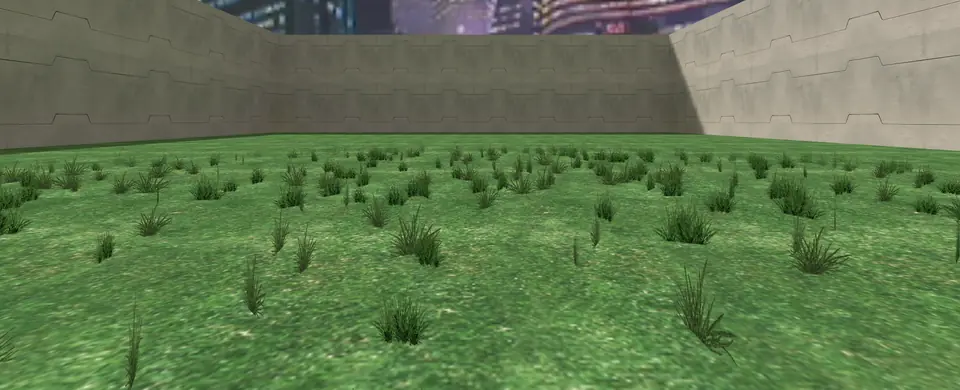
Grass pieces thinning out with distance
Downloads
When the map starts, the server adds these files to the download list:
- The materials file of the map, and the files that it reads with
#includeand#types - The step and hit sounds of the letters that the textures of the map use
- The debris sprites and ricochet sounds that the files of the map name for its textures
- A custom grass sprite
The files for every map come with the game, so the server doesn't send them.
Player option
Players can turn off debris chips and dust puffs with the setting
cl_effectsdetail, while sparks, decals and sounds stay. The same setting can
be found in Options > Multiplayer > Bullet impact and gun effects. The same setting also turns off the water splashes of bullets and the smoke from the barrel of the
player's gun.
Notes
| Limit | Value |
|---|---|
| Texture lines in all files | 1024 |
#include depth | 2 |
| Files that the file of a map reads, itself included | 8 |
| File size | 256 KiB |
texture blocks | 32 |
| Files the materials add to the download list | 64 |
Changes since 1.38
- The SBO textures have their materials from
materials/textures.txton every map. SBO 1.38 read only thesound/materials.txtof Half-Life, so all SBO textures were concrete. The material system gives every surface its own sounds, so it applies to every map, also custom maps - Wood (W) has its own footsteps. In SBO 1.38, wood sounded like concrete. Wood uses the wood footsteps of Counter-Strike: Condition Zero Deleted Scenes on every map
- The materials A, E, R, N, L, Z, I, X and K, the map's materials file, bullet impact effects and grass are new
See also
worldspawn- the Materials file key and the grass keys- Custom content - how players download the materials files and sounds
- Old maps - what the materials change on maps made for SBO 1.38