Model scale
Model scale draws a model bigger or smaller with the scale key, from a giant monster to a tiny prop. The model
grows or shrinks around its origin: 0.5 is half size and 2 is twice the size, and an empty value, 0 or 1 is the
normal size. On monsters and props, the collision box and the hitboxes grow or shrink with the model, so a giant
monster is also a bigger target.
co_sbo_showcase has a room with a 5x imp, robots at 1x and 0.2x, a 0.3x zombie, a Fed with grow and
shrink buttons, and a button that spawns a random monster and grows it to 3x.
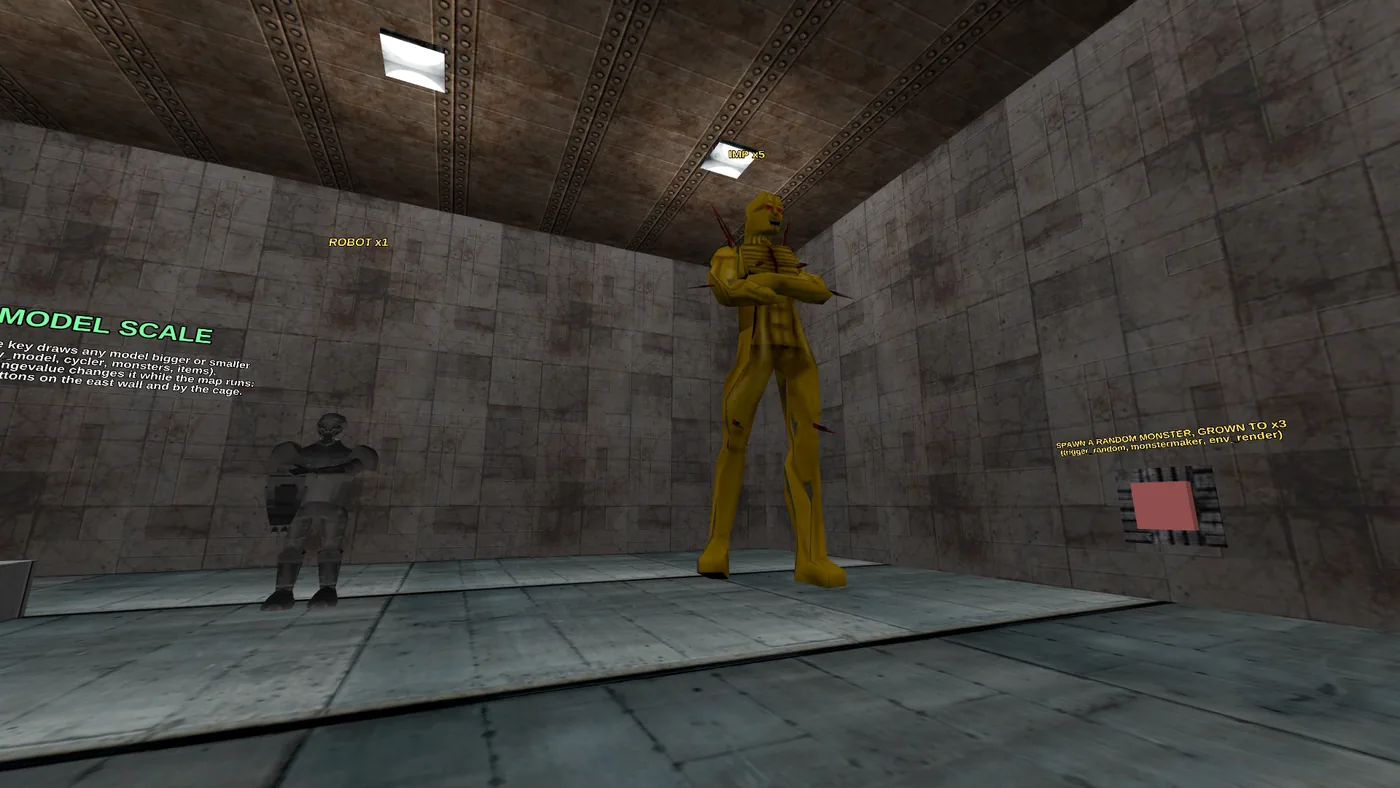
An imp at five times its size next to a normal robot
Where it works
The editor shows the key Model scale on these entities:
- Monsters and dead monsters, including
monster_furnitureandmonster_generic - The pick-up items
item_battery,item_airtankanditem_pickup, andammo_reserve
env_model, env_static,
env_modeltrain and an env_sprite that shows a .mdl
have their own Scale key, and a monstermaker has Children's scale, which
gives every monster it makes that scale. The key also draws each other entity with a .mdl model at its scale, for
example a func_rotating with a model. It does nothing on brush models and on
players.
What scales
On monsters, dead monsters, items and ammo_reserve, the scale changes most of what the model does. It doesn't
change how a monster moves through the map:
| What scales | What doesn't scale |
|---|---|
| The model that you see and its animation | How a monster moves through the map: its hull, where it fits, its node paths and the steps it climbs |
| The collision box that players and monsters hit and that triggers touch | The eye height of a monster |
| The hitboxes that bullets hit | The free-space check of a monstermaker |
| The attack distances and melee reach of a monster | |
| The attachments, which are where the bullets, muzzle flash and grenades of a monster start |
The hitboxes and attachments come from the QC file of the model. See the QC guide on the303.org for more details, and Useful tools for model viewers that show them.
The engine moves monsters with one of the four hull sizes compiled into the map. So a 3x Fed still fits through the doors that a normal Fed fits through, with its model and its box partly in the walls. A 0.5x Fed doesn't fit through gaps that are too small for a normal Fed. Attack distances start at the edge of the scaled box, so a 4x zombie claws a player who stands at its box. A scaled model is lit like the same model at scale 1. At very small scales, the box keeps at least 1 unit on each side.
On every other entity, only the model that you see scales, and the box and the hitboxes stay the same.
env_sprite with a model
An env_sprite with a .mdl plays one animation sequence of the model in a loop. You pick the sequence with the
key Sequence, which is 0 by default, and Framerate is then the speed of the sequence: 1 is the normal speed of
the sequence, 0.5 is half and 2 is twice that speed, and 0 holds the first frame. The editor default of 10 is meant for the
frames per second of a sprite, so set Framerate to 1 for a model, or it plays 10 times too fast.
When you trigger the env_sprite, it shows or hides the model. Each time the model shows, the sequence starts from
its beginning. With Play Once, the entity hides the model after the sequence has played one time.
Changing the scale while the map runs
A trigger_changevalue with the key scale changes the size and the box
immediately. An env_render with Scale does the same if it has no Fade Time.
With a fade time, the model grows or shrinks smoothly, and its box and hitboxes follow it step by step. See
Props, models and fades for more details.
Two env_render entities with Fade Time 2: one with Scale 2.5, one with Scale 1
Notes
- A model with a scale above 1 can reach out of the part of the map it stands in. So that it doesn't vanish while you can still see part of it, every player's game gets it all the time, wherever the player is in the map. Each such model adds a little network traffic for every player, all over the map
- The scale works in steps of 1/256, so 0.125, 0.25 and 0.5 are exact, and it goes up to about 255
Changes since 1.38
- The
scalekey draws models at that scale. SBO 1.38 always drew them at their normal size - The animation of a
.mdlon anenv_spriteis smooth and starts when the entity spawns or shows - Maps made for SBO 1.38 with a
scalekey on a model show the model at that size. See Old maps for more details
See also
env_render- changes the scale, with or without a fadetrigger_changevalue- changes thescalekey at onceenv_sprite- shows a sprite or a model- Props, models and fades - models as scenery and fades
- Entity keyvalues - the keys many entities share