Moving objects
Move With is experimental. Great care has been taken to get it into a working state, but due to the nature of the engine it may never work perfectly.
Move With lets you put one entity on another, such as a door on a train or a lamp on a lift. The Move with key comes from Spirit of Half-Life, a kit for making Half-Life mods developed way back in 2000.
SBO 2.0.0 adds many improvements that the original never had, such as children that follow their parent as it turns. Even so, Move With will always be imperfect, because of the engine it runs on. Half-Life's engine comes from Quake, and like Quake it stores every angle as three numbers: pitch, yaw and roll. These three numbers can't describe a turn on top of another turn exactly, such as a door on a turning train, so small errors can show. Laurie Cheers, the author of Spirit of Half-Life, describes the same limit:
I spent a bunch of time trying to get compound rotations to work (e.g. a door moving with a rotating train), but it never quite looked right. (There's a reason why modern engines no longer use Quake's pitch/yaw/roll angle system.)
Laurie Cheers, PHQ interview (2015)
The idea
Any entity can move with another entity, which is then its parent. The entity that moves with it is a
child. Put the name of the parent in the Move with key (movewith) of the child. The child then moves and
turns with the parent, and it keeps the position and the angles that it has on the parent in the editor. A child can
have its own children, so a hook can hang from a hoist that rides on a crane.
A train pulls into a stop with its door, roof lamp, headlights and sign riding along, then its door slides open
Build each child where it belongs on the parent, as you see it in the editor. This is also correct when the parent
moves away immediately at map start, such as a door that starts open or a func_train
that jumps to its first path_corner. The game measures each child against the parent
as you placed it.
Any entity can be a parent: trains, track trains, doors, rotating doors, lifts, func_rotating,
func_pendulum, monsters, models and other children. Maps made for XashXT can use
the key parent in place of movewith, and SBO also reads that key.
Keys
Every entity that can move with a parent has these keys in the editor.
| Key | Description | Default |
|---|---|---|
Move withmovewith | The name of the parent. If several entities have that name, the first one counts. A name that ends in .1 to .4 puts the child on that attachment point of the model of the parent. See Attachments for more details | |
Axis locksparentflags | Keeps some of the position or angles of the child, so they don't follow the parent. Add up the axes that you want to keep: 2 for X, 4 for Y and 8 for Z, and 16 for pitch, 32 for yaw and 64 for roll. 112 keeps all three angles, so the child stays level | 0 |
A train with a door
A common setup is a train that carries a door, which opens at each station.
- A
func_trainnamedtrain_main, with its first stop at apath_cornernamedstation_a - A
func_doorin the doorway of the train, namedtrain_door, with Move withtrain_main - On
station_a, Fire On Pass set totrain_door, and Wait here set long enough for players to get on
The door opens and closes relative to the train, so it slides along the side of the train at all positions and angles of the train. Players who stand in the train ride with it, as on any train.
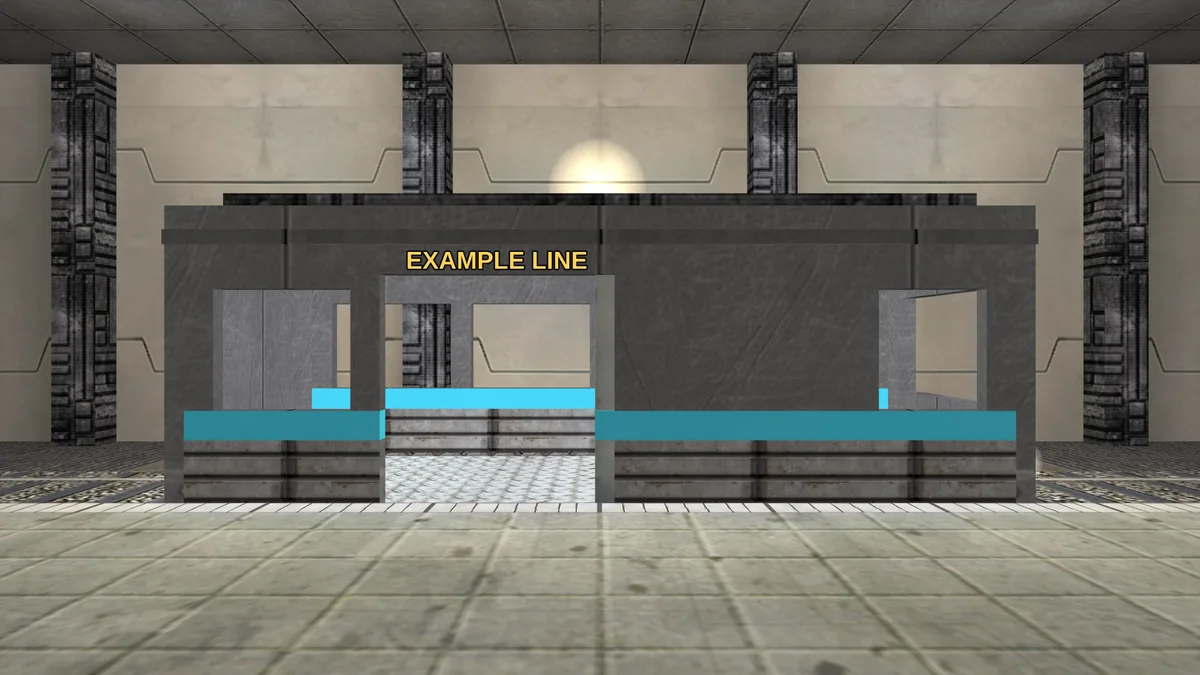
The example train at its first stop with its door open
Example map: sdk/examples/maps/co_example_movewith/ builds this train, with a lamp, two headlights and a sign that ride along too.
The full Move With map, sdk/examples/maps/co_example_movewith/_full/, is a small city with a train, a lift, a crane, a drawbridge, a boat, a carousel and more, and a test wing whose rooms each show one tricky case. Every place has an Info button that opens a box with the entities and keys it uses.
A wheel (momentary_rot_button) with Move with train_main turns on the
train while a player holds it. It can drive a momentary_door that also moves with
the train, such as a window that goes up and down while the train drives.
You can add a world screen, a world text sign, a lamp
(env_sprite), a trigger_camera and an engine sound
(ambient_generic) to the train in the same way: give each of them Move with
train_main. The sound then plays from the train as it drives past.
A lift with a gate
- A
func_doorthat moves up, namedlift_cab - A gate, also a
func_door, with Move withlift_cab, and afunc_buttoninside the cab with Move withlift_caband Targetlift_cab - On
lift_cab, Fire On Stop set to the gate, so the cab opens the gate when it arrives at the top or the bottom
The gate and the button ride with the cab, and the gate opens and closes on the cab at all positions of the cab.
A crane
With a chain of children, one part can hang from another part:
- The arm, a
func_door_rotatingnamedcrane_arm - The hoist, a
func_doorthat moves down, namedcrane_hoist, with Move withcrane_arm - The crate, a
func_wallwith Move withcrane_hoist
The hoist turns with the arm and comes down at the end of the arm, and the crate stays on the hoist all the time. The hoist and the crate each need their own origin brush. See the next section for more details.
A turning platform
Give a func_rotating a few crates (func_wall) and a
lamp, all with Move with set to the name of the platform. They turn with the platform and stay in their
positions, and players who stand on the platform also ride around with it.
A solid brush child on a parent that turns needs its own origin brush, for example a small one in its middle.
Without an origin brush, the origin of the child is the origin point of the map, far away, and the game turns the
child around that point. So the child pushes things that it hits along a wide arc, but not the things that stand on
it. Players and monsters who stand on it still ride correctly. With developer 1 set in the console, the console
warns about each such child when the map starts.
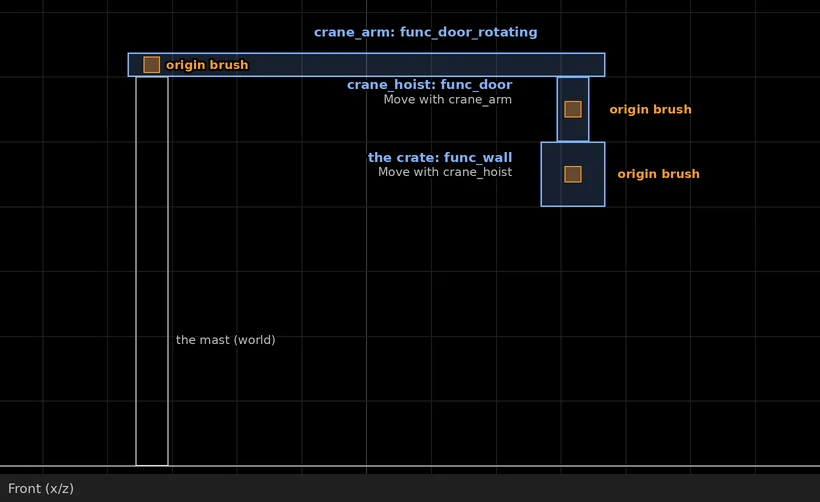
A crane whose parts each move with the part above
Attachments
An attachment point is a point on a model that moves with one of its bones, such as the muzzle of a gun or the tip of
a tail. The author of the model places it with the $attachment command in the QC file, and the game uses the first
four points of a model. See the303's QC guide for more details.
A child that moves with a model can sit on one of these points. The child then follows the point when the model moves and when it plays an animation. The parent can also be a monster, so you can add sprites, glows and models to a monster, such as a light on a Fed's gun.
Find the attachment points of a model
You can see the attachment points of a model in Half-Life Asset Manager (see Useful tools):
- Open the model (
.mdl) in Half-Life Asset Manager - On the Model Display tab, turn on Show Attachments. Each attachment point shows as a green dot in the 3D view
- Open the Attachments tab. The list shows "Attachment 1", "Attachment 2" and so on, with the bone and the position of each point
Half-Life Asset Manager counts the points from 1, as Move with does, so "Attachment 1" is .1.
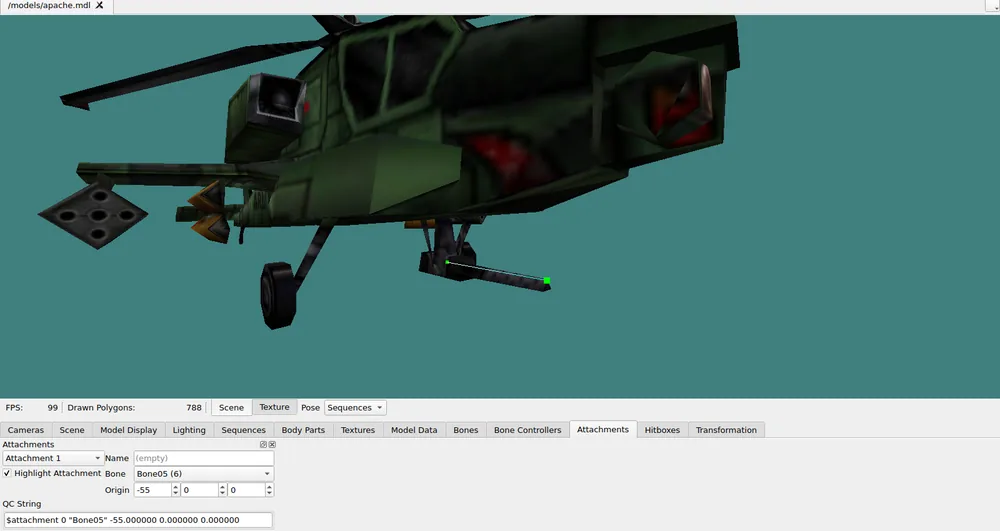
A model's attachments in Half-Life Asset Manager
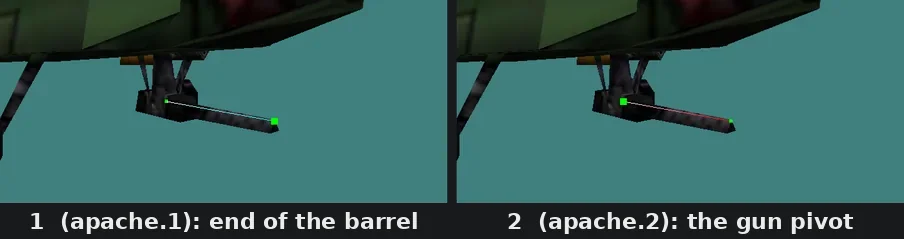
The Apache: 1 (apache.1) is the end of the gun barrel and 2 (apache.2) is the gun's pivot, both on the bone Bone05
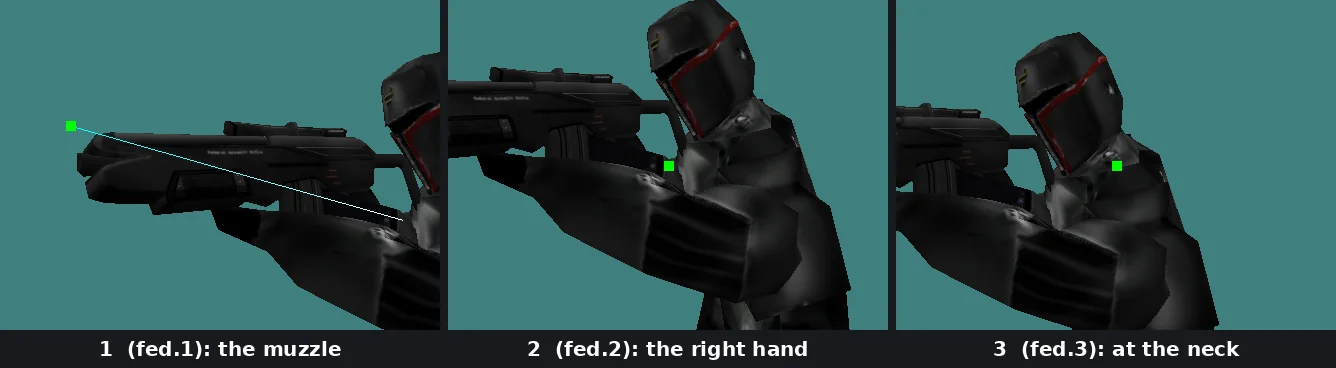
A Fed: 1 (fed.1) is the muzzle of the gun and 2 (fed.2) is the right hand, both on Bip01 R Hand, and 3 (fed.3) is at the neck, on Bip01 Head
Put a child on an attachment point
This example puts a glow sprite on the gun of a helicopter:
- Give the helicopter a name, for example
heli - Place an
env_spritenear the helicopter - Set its Move with to
heli.1. The dot and the number after the name select the attachment point, from.1to.4 - Run the map. The sprite sits on the first attachment point of
heliand follows it
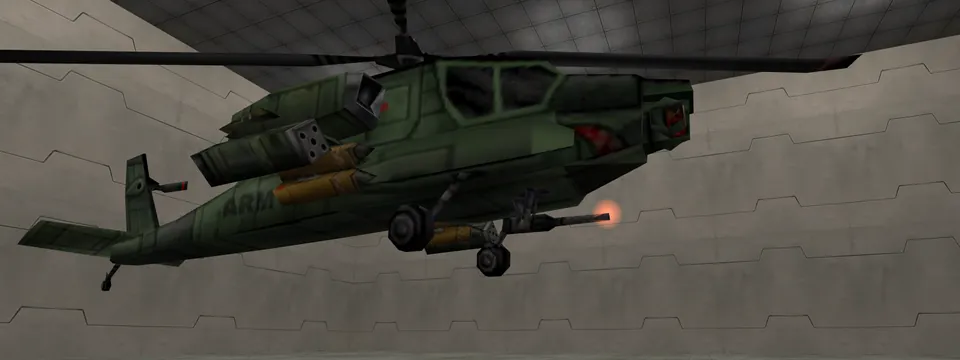
An env_sprite with Move with apache.1 sits at the end of the Apache's chin gun
A sprite that stays on a Fed's gun while the Fed moves
A Fed named fed is the parent, and an env_sprite with Move with fed.1 is the child. The sprite sits at the
muzzle of the Fed's gun, and stays there when the Fed turns and aims
Only a child that isn't solid can sit on an attachment point, such as a sprite, a model that isn't solid, an
info_target or a trigger_camera. A solid child
follows the origin of the parent instead.
These rules also apply:
- A name that matches an entity exactly always wins, so a parent named
door.1still works as a plain name - If the model has no such attachment point, the child follows the origin of the parent. If the parent changes to a model without that point, the child follows the origin until the point is back
- With
developer 1set in the console, the console tells you when a child follows the origin instead of the point
The same point in other entities
Other entities also use attachment points, but some count from 0 and some count from 1:
| Point | Move with | env_sprite, env_elight, locus_beam | env_particle | calc_position |
|---|---|---|---|---|
| The first | .1 | 1 | 0 | Attachment point 0 (5) |
| The second | .2 | 2 | 1 | Attachment point 1 (6) |
| The third | .3 | 3 | 2 | Attachment point 2 (7) |
| The fourth | .4 | 4 | 3 | Attachment point 3 (8) |
Axis locks
With Axis locks (parentflags), a child keeps some of its position or angles from the moment that it was linked.
It follows the parent only on the other axes:
| Value | The child keeps |
|---|---|
| 2 | Its X position |
| 4 | Its Y position |
| 8 | Its Z position, so it keeps its height |
| 16 | Its pitch |
| 32 | Its yaw |
| 64 | Its roll |
Add up the values, so 112 keeps all three angles. A lantern that hangs from a drawbridge, or a gondola on a big wheel, needs this: it moves with the parent but always hangs straight down.
Changing the parent
A trigger_changeparent gives entities a new parent while the map runs, or
removes their parent. Set Entity to re-parent to the entities that you want to change, and New parent to the
name of the new parent. When you trigger it, every entity with that name changes. An entity keeps its position at
the moment of the change, and then moves with its new parent from that position. If you leave New parent empty,
the entities stop where they are and don't move with anything.
A trigger_changevalue on the keys movewith, parent or parentflags of a
child does the same as a trigger_changeparent, so you can move a crate from one train to another with either
entity. See Changing keys for more details.
Names: aliases, groups and wildcards
Move with and the names of a trigger_changeparent work like the names in every other target key. So they also
take an alias (*name), a member of an info_group, and a name that ends in *. In
Move with, a name that ends in * means the first entity whose name starts with the rest (see
What * means in a name). A trigger_changeparent also takes
!activator, the entity that started the chain, and !caller, as the entity to re-parent or as the new parent. As
in the Target of any entity, !caller is the trigger_changeparent itself. A name that matches an entity
exactly always comes first.
The game finds the parent when it links the child, which is at map start or when a trigger_changeparent fires. If
you later point the alias at another entity, the child stays on the first entity. To make the child follow the
alias again, trigger a trigger_changeparent with New parent set to the same *name.
Cameras, world text and screens
- A
trigger_camerathat moves with a parent rides with it and keeps its own aim and turning, so it still turns to look at its target. It ignores its own path while it has a parent. If you give it both, the console saystrigger_camera <name> has a parent, so it ignores its path and rides with the parentwhendeveloper 1is set in the console. With Start At Player, it takes only the view angles of the player and stays on its parent. It can also be on an attachment point - A world text (
point_worldtext) and a world screen (vgui_screen) without Surface ride and turn with their parent. Each player's game draws them on the parent, so they never stay behind it. Players aim at and click a moving screen as usual. The parent must be something that the players' games draw, such as a brush or a model. While the parent is out of the view of a player or hidden, the text or screen stays where it was last drawn. Axis locks don't apply to them - A world screen on a brush (a
vgui_screenwith Surface) already moves with that brush, so give Move with to the brush, not to the screen - A spawn point, such as an
info_player_go2, with Move with set to a moving platform makes players spawn on the platform at its current position - A
trigger_motion, amotion_manageror atrigger_changevalueonoriginoranglescan also move a child. A new position or new angles move the child there, and the child then keeps that position on its parent. A velocity is the movement of the child on top of the movement of its parent. So a crate pushed along a cart continues to ride on the cart from its new position - On a solid child, the position modes of these entities, such as Set new position and Offset position, units per second, move it in jumps, so players who stand on it don't ride with it. With the velocity modes, they ride with it
Guns on moving objects
A gun (func_tank and the other tanks) with Move with turns with its parent. Its
aim, its ranges and its center angles stay relative to its mount, so it aims where its user looks while the boat or
train under it turns. Give its func_tankcontrols the same Move with, so the
controls also ride with it. Do the same for the tanks in its Extra barrels name, which then aim with it on the
parent. If its yaw range is less than 180, it always turns through that range to reach a target, and never through
the arc behind it. So the barrel doesn't turn through the player who stands behind the gun.
What can't move with a parent
The game refuses Move with on these entities, and the entity then stays where it is. With developer 1 set in
the console, the console says why when the map starts.
- Monsters, players and pushable crates (
func_pushable), and things that fall or fly, because they move by themselves. They can stand on a moving object and ride with it. See Standing on moving objects for more details - Things that your game gets one time and then draws from its own copy:
env_mirror,env_static,func_rainvolume,func_snowvolume,color_correction_volumeandenv_fogzone - Trains and other things that move on their own path or axis:
func_train,func_tracktrain,func_rotating,func_pendulum,func_vehicle,env_modeltrainandenv_spritetrain. Any of them can be a parent
Some things can't move at all:
- Lights (
light,light_spot) are part of the lightmaps that the compile tools make. For a lamp on a moving object, use a glowing sprite, a light texture on the brush, or a model or sprite with a dynamic light in its Effects - Beams that end on an
info_targetcan't follow it, because aninfo_targetexists only on the server and the players' games don't know where it is
Standing on moving objects
All things that stand on a solid child ride with it, as on a train or a lift: players, monsters, pushable crates and
dropped weapons. So a scientist can ride a carousel and a crate can ride a turning platform, but neither can have
Move with itself. A monster or a crate also keeps its position on a parent that turns while it moves, such as a
func_tracktrain with children in a curve. On a train without children, it rides
as in Half-Life.
When a player blocks the parent or a solid child, the full chain waits: the parent and all its children. A stock
train also waits for a player who blocks it. Everything stays in its position while it waits, and everything moves
on together when the player steps away. The rules of the parent decide what happens: a door goes back or crushes,
and a train waits and causes the damage of its Damage on crush. If a trigger stops or starts the parent while it
waits, the parent keeps that state when the player steps away. A new speed starts where the parent usually reads
it, which for a func_train is its next stop.
Limits
- A chain can be at most 16 parents deep, and the game doesn't link a chain that loops back on itself
- A child of a parent that isn't a brush mover, such as a monster or a model, follows one frame behind it
- Brush triggers (
trigger_hurt,trigger_multipleand similar entities) follow the position of the parent, but their volume doesn't turn - A looping
ambient_genericplays on the parent, or on the nearest part of it that the players' games draw, not at its own position. Two of them that play the same sound file need two such parts, or if you turn one off, both turn off. Withdeveloper 1set in the console, the console says so - When a parent is removed, for example a broken
func_breakableor by a KillTarget, its children stop where they are and don't move with anything, also after a new round. A looping sound that played on the parent stops - If you hide a parent, its children don't hide
- When a part turns and moves at the same time, such as a seesaw, a carousel seat or a train with children in a curve, a door that closes on a monster or a pushable crate that rides it can go into it for a moment
- Two riders that are closer than about 45 units to each other, such as a player and a monster in a train car, can hit each other in a curve. One of them then stays a little behind, as on any train in Half-Life
Playing online
Moving objects work well in online matches. Near a carousel, a sign of 200 parts or a train with doors, windows and lamps, each player gets about 4 kB/s more data than near the doors and trains of a stock map. This is well below the default rates, and the number of players in the game doesn't change it.
A lamp, a sign or a solid part that rides on a parent uses no network data while the parent moves. Each player's game learns the position of the child on the parent one time and draws it there, so only the parent uses network data as it moves.
In these cases, a child uses a few bytes of network data each time it moves, like any moving object:
- The child has Axis locks
- The player's game doesn't draw the parent, for example when the parent is far behind walls or hidden
- The child is a door, button or other mover that moves on its parent, such as a train door while it opens
Children without a model, such as an info_target, a brush trigger or an ambient_generic, use no network data.
Riding with a high ping
Each player's game works out where doors, lifts, trains and their children will be when the server moves that player. So a player with a high ping stands still on a moving floor, lands on a rising lift and walks through a train car, and doesn't bounce or sink in. This works on every map, with or without Move With.
The game knows the stops of doors, lifts, buttons and a func_train before they
happen, so they stop exactly. A func_tracktrain, a
func_rotating or a func_pendulum has no stop that
the player's game knows. When such a train brakes for a station, for example on a
train_setspeed, a player with a high ping sees the view jump back one time. The
jump is about the distance that the train moves in the time of their ping: about 60 units at a ping of 300 ms on a
train at 200 units a second. After that, the player rides normally. A func_train stops at its
path_corner without that jump.
On a lift that rises fast, a player with a high ping sees the view a little lower while the lift rises. The view settles smoothly when the lift stops.
Changes compared with Spirit of Half-Life
Move With in SBO doesn't use the code of Spirit of Half-Life, but it reads the same movewith key. A mapper notices
these differences:
- Children go around every turning parent, such as a
func_rotating, afunc_pendulumor a track train in a curve. In Spirit, only children of a rotating door, aninfo_targetor a walking monster did this, and children of all other entities turned in place - Solid children on a turning parent push and carry players. Spirit moved them into position in each frame, which didn't carry players and could leave players stuck inside
- When a player blocks a parent or a child, the full chain waits in place, so the parts don't drift apart. The documentation of Spirit warned about this problem
- Children follow their parent exactly every frame, so they don't drift away and then jump back into place
- Lamps, signs, doors and other children are drawn on their parent by each player's game, so they don't lag behind or jitter, even with a high ping
- Players with a high ping ride moving objects smoothly, because each player's game works out where they will be, while in Spirit they bounced on them as in Half-Life
- A looping sound on a moving object plays from the object as it moves, while in Spirit it stayed where it started
- Entities that don't move with anything work exactly as in Half-Life, while Spirit also changed how every monster thinks, even on maps without Move With
- Moving objects work on an empty server and with any number of players. Spirit did part of the work in the updates of the players
- A sprite can sit on an attachment point of its parent's model, while Spirit only attached monsters and
info_targetentities - A parent name with a dot in it works, while Spirit read any name with a dot as an attachment and cut off its end
- A chain that loops back on itself, or an entity that can't move with a parent, gets a console line that names it
Changes since 1.38
- Any entity can be attached to another entity and moves and turns with it, as in Spirit of Half-Life. Put the parent's name in the new Move with key (
movewith) trigger_changeparentgives an entity a new parent while the map runs- Movewith is experimental, test thoroughly when using it
See also
trigger_changeparent- gives entities a new parent- Changing keys -
trigger_changevalueon the Move With keys - World screens and World text - screens and signs that can ride along
- Particles - an
env_particlefollows an entity with its own Move with entity key