Music and sound

An ambient_music plays MP3 music that every player hears anywhere on the map. An
ambient_generic has play modes that make a sound play once or loop, even against
the loop points of its WAV file. Two of these modes add a linear falloff, so the sound gets quieter the farther each
player is from it.
ambient_music
| Key | Description | Default |
|---|---|---|
MP3 filemessage | The file, as a path from sound/, for example mymap/theme.mp3 |
It has these flags:
- Start Silent (1) - The music doesn't start when the map loads
- Loop (2) - The music starts again when it ends
The game of each player plays the file with the MP3 player of the engine, at the MP3 volume that the player set in
their options. Without Start Silent, the music starts when the map loads. A trigger starts the music when it is
off, and stops it when it is on. Only one track plays at a time, so a second ambient_music that starts replaces
the track. An ambient_music that stops ends the music only if its own track is playing. A player who joins hears
the current track from its start. The file goes on the download list automatically.
An ambient_generic with an .mp3 file plays it in the same way, as music for every player. If you set its Play
Mode to "Loop", it loops.
The path must obey these rules. If it doesn't, the game removes the entity when the map loads, and with
developer 1 set in the console, the console shows an error:
- It is a path inside
sound/, and it ends in.mp3 - It has only letters, digits and
/ _ - ., and no.. - It has up to 57 characters
ambient_generic play modes
These keys of ambient_generic choose how a sound plays:
| Key | Description | Default |
|---|---|---|
Play Modeplaymode | How the sound plays, which the table below lists | Default (0) |
Linear Minlinearmin | Up to this distance, the sound plays at full volume. The distance is in steps of 256 units, so 1 is 256 units | 0 |
Linear Maxlinearmax | From this distance, the sound is silent. The distance is in steps of 256 units, and 0 makes the sound silent at all positions | 0 |
| Value | Mode | What it does |
|---|---|---|
| 0 | Default | The flag Not Toggled and the loop points of the WAV file decide |
| 1 | Play once | The sound plays once for each trigger, even a WAV file that has loop points |
| 2 | Loop | The sound loops, even a WAV file that has no loop points |
| 5 | Play once, linear falloff | Like "Play once", with a linear falloff |
| 6 | Loop, linear falloff | Like "Loop", with a linear falloff |
A linear falloff sets the volume for each player by their distance to the entity. The sound is at full volume up to
Linear Min and silent from Linear Max, and the entity ignores its radius flags. With Play Everywhere, the
two falloff modes, "Play once, linear falloff" and "Loop, linear falloff", play like "Play once" and "Loop", without
a falloff. For example, the lounge of co_sbo_showcase plays music in the mode "Loop, linear falloff" with Linear Min 1
and Linear Max 3, so the music is at full volume within 256 units and silent at 768 units.
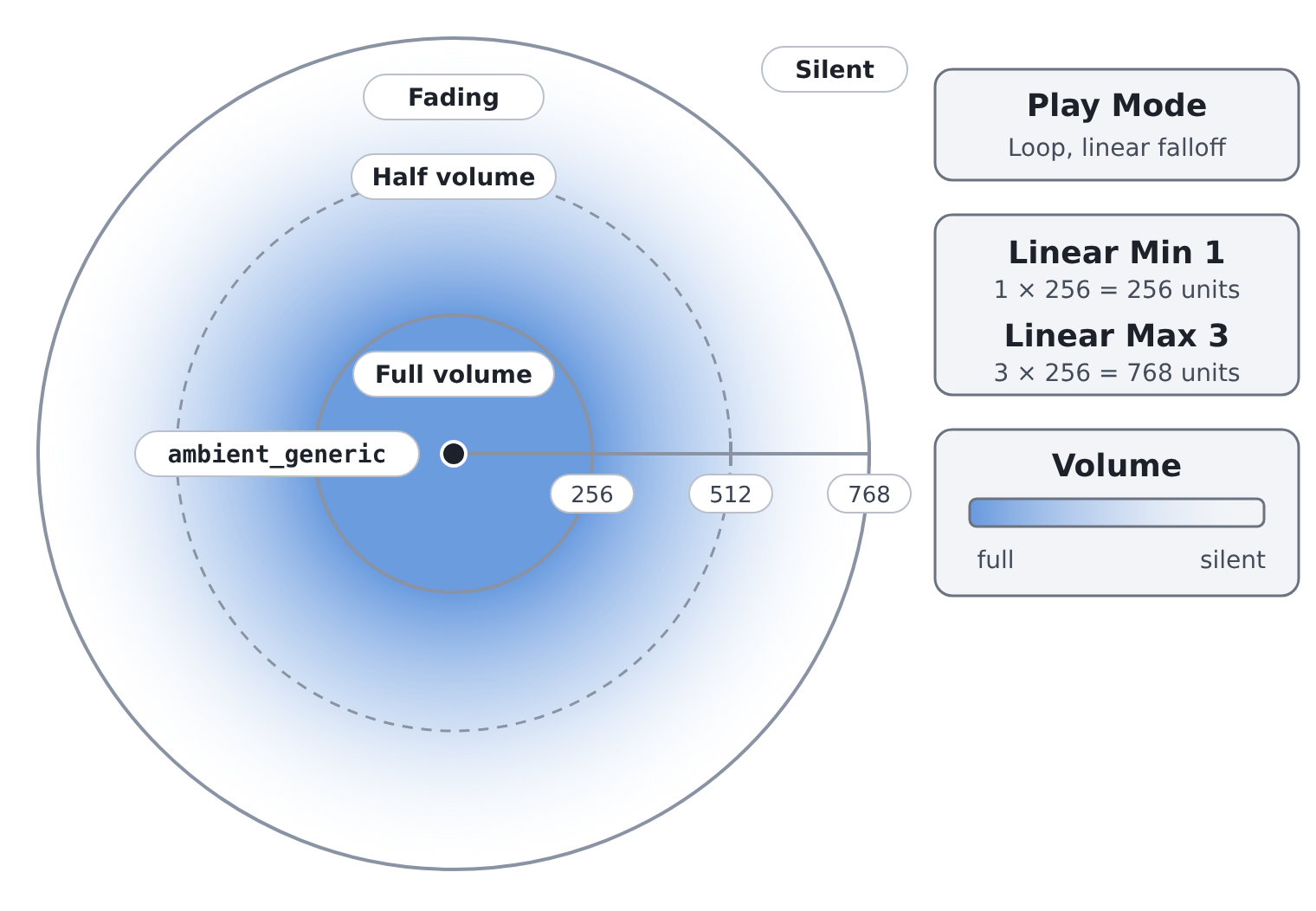
How the music volume falls off with distance, seen from above
In the modes 1 to 6, the server starts the sound for each player. A player who joins gets the sound one second after
joining. If you make a WAV file without loop points loop, it starts again when a player comes into range. With
developer 1 set in the console, the console shows a line about such a file. If the game can't read the length of a
WAV file, the file plays in the mode "Default", and with developer 1 set in the console, the console shows an
error. A WAV file loops smoothly only if it has loop points. See
Looping a sound for more details.
Changes since 1.38
ambient_musicand theambient_generickeys Play Mode, Linear Min and Linear Max are new
See also
ambient_music- the music entityambient_generic- every key of the sound entity- Custom content - how players download your sounds