Particles
Particles give your map steam, sparks, fire, smoke and other effects that move and change over time. An
env_particle plays an Aurora particle script, a small text file in the .aur format
of Spirit of Half-Life, XashXT and PrimeXT. The scripts of those mods play in SBO next to the scripts that come with
the game, and you can make your own in-game with the particle editor, or in your
browser with the Aurora web editor.
The Aurora web editor is in alpha. It works, but it will change in the future.
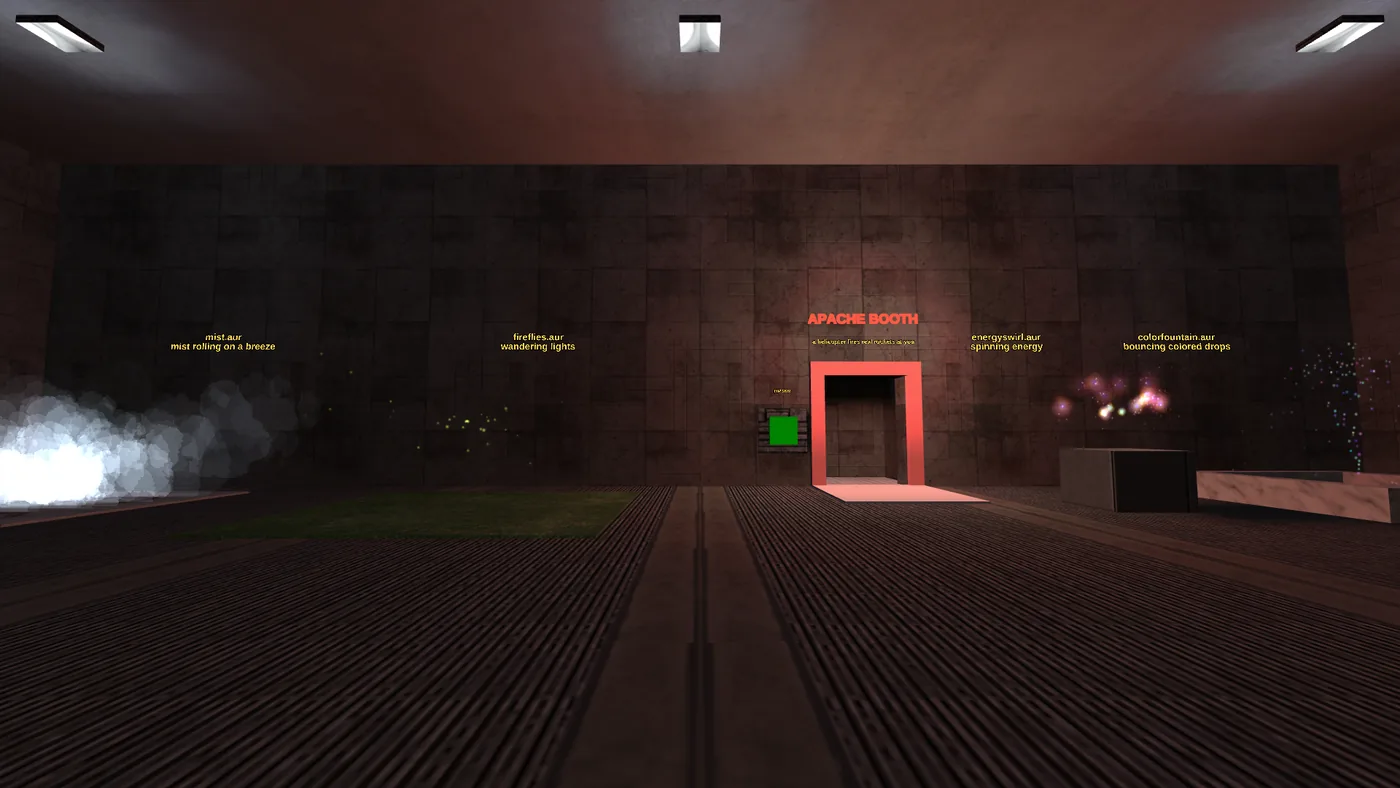
The Aurora hall of co_sbo_showcase has eight effects side by side.
Particle effects in a hall
The entity
| Key | Description | Default |
|---|---|---|
Particle scriptmessage | The .aur file, as a path from the game folder, with up to 63 characters and without .. | aurora/steamvent.aur |
Anglesangles | The game adds the pitch and the yaw to the spraypitch and sprayyaw of the script, so a pitch of 90 turns the spray 90 degrees down. The entity ignores the roll, and the wind doesn't turn with the entity | 0 0 0 |
Move with entitytarget | The effect moves and turns with this entity, and it keeps the distance to the entity that it has in the editor. While a player can't see that entity, the player can't see the effect | |
Attachment pointattachment | If Move with entity names an entity with a .mdl, the effect is on attachment 0 to 3 of the model. "None" (-1) means no attachment | None (-1) |
It has these flags:
- Start On (1) - A named
env_particlestarts on - Spawn Use (2) - Each trigger shows a one-time copy of the effect at the position and angles of the activator
An effect without a name is always on. With a name, a trigger switches it on or off, and the
use types On and Off set that state. Players who join later, and spectators, see each
effect in its current state. A Spawn Use copy emits particles for the top-level lifetime of its script, or
for the lifetime of its main type if the script has none. It's 5 seconds if neither is set, and 120 seconds at
most. Then its particles die out, and the game removes any that are left 30 seconds later. Players download the
script and the sprites that it names automatically.
Scripts that ship with the game
| Script | What it shows |
|---|---|
steamvent.aur | A jet of steam |
sparkshower.aur | Welding flashes that spray bouncing sparks |
emberbarrel.aur | A barrel fire with embers and smoke |
mist.aur | Waterfall mist drifting on a breeze |
energyswirl.aur | Spinning blue to violet energy orbs |
fireflies.aur | Lights wandering over an area |
colorfountain.aur | Colored drops bouncing on the floor |
traintrail.aur | Exhaust that stays behind a moving entity, made for Move with entity |
muzzleburst.aur | Bursts of muzzle flashes, made for Attachment point |
wrecksmoke.aur | Smoke that is lit by the place it drifts through and goes out under water |
wrecksmoke_unlit.aur | The same smoke without lighting |
The aurora/ folder also has the scripts of Spirit of Half-Life: smoke.aur, smoke2.aur, torch.aur,
fountain.aur, sparker.aur, signal.aur, galaxy.aur and others.
The .aur format
A script is a list of "key" "value" pairs. A few keys are alone at the top, and all the other keys belong to
particle types, with one { } block for each type. // starts a comment, and keys can be in upper or lower case.
This script makes a column of rising smoke:
"particles" "100"          // particles of this system at most
"maintype" "smokesource"   // the type the entity emits

{
  "name" "smokesource"     // the main type: one particle on the entity
  "spraytype" "smoke"      // sprays this type
  "sprayrate" "10"         // 10 a second
}

{
  "name" "smoke"
  "sprite" "sprites/ballsmoke.spr"
  "gravity" "40"           // rises
  "lifetime" "2"
  "startsize" "0"
  "endsize" "40"
  "startalpha" "0.3"
  "endalpha" "0"
  "startangle" "0..360"    // a random value for each particle
}
The main type is one particle that stays on the emitter while the effect is on. It draws nothing without a
sprite, so usually it only sprays. A particle with a spraytype sprays particles of that type, sprayrate times
a second, and a sprayed type can also spray another type. A sprayed particle starts with the speed of its parent plus
the spray. An overlaytype draws a second type on the same particle. The overlay has the same position, size and
spin, but its own sprite, colors, opacity and frame.
aurora/smoke.aur: the main type smokesource draws nothing and sprays 10 smoke particles a second
Any number can be a range min..max, and each particle gets its own random value in it. 0..360 and 360..0 mean
the same. You can also write the name of a type before its { } block. If a script has a mistake, the rest of the
script still loads, and the game skips each key that it doesn't know. With developer 1 set in the console, the
console shows one line about each mistake.
Top-level keys
| Key | Description | Default |
|---|---|---|
particles | How many particles this system can have, overlays included, from 1 to 2048. When all of them are in use, a spray waits for a free particle | 100 |
maintype | The type on the emitter. Without it, the system shows nothing | |
lightmodel | With 1 or 2, the game multiplies the color of each particle by the light of the world at its position, with its light styles. It measures the light every tenth of a second. With 0, the particles are unlit | 0 |
killcondition | empty, water or solid. When the point of the emitter is in open space, in water or inside a solid, the effect stops permanently, and its living particles finish their life. The game also reads this key inside a type block, with the same effect on the whole system | |
attachment | The attachment point the effect sits on when Move with entity names a .mdl and Attachment point is "None". This key counts from 1, as XashXT and PrimeXT do, so 1 is the entity's attachment 0, and 0 means no attachment. If you pick an Attachment point on the entity, that one counts instead | 0 |
lifetime | How many seconds a Spawn Use copy emits particles. It replaces the lifetime of the main type for the copy, as in PrimeXT. An effect that the entity switches on and off keeps running |
Type keys
Each type block takes these keys. Values that change from a start to an end change evenly over the life of the particle.
| Key | Description | Default |
|---|---|---|
name | The name of the type, up to 29 characters | |
sprite | The sprite, for example sprites/glow01.spr. Without a sprite, the game draws nothing | |
rendermode | How the game draws the sprite: additive, where black is invisible, solid or texture, which blend by the alpha of the sprite, or color | additive |
lifetime | How many seconds the particle lives, so a sprayed particle with 0 dies immediately. For the main type, it is the length of a Spawn Use copy | 0 |
startsize | Half the width of the sprite square in units, and a particle with 0 or less isn't drawn | 0 |
endsize | The size at the end of its life | |
sizedelta | If there is no endsize, how many units per second the size changes | 0 |
startalpha, endalpha | The opacity at the start and at the end of its life, from 0 for invisible up to 1 for solid | 1, 1 |
startred, startgreen, startblue | The color at the start, each from 0 to 1 | 1 |
endred, endgreen, endblue | The color at the end of its life | 1 |
startframe | The sprite frame at the start, and the frames loop | 0 |
endframe | The frame at the end of its life | |
framerate | If there is no endframe, how many frames per second it plays | 0 |
startangle | How far the sprite is turned at the start, in degrees | 45 |
angledelta | How many degrees per second the sprite spins | 0 |
gravity | The upward pull in units per second squared, so positive values rise and negative values fall | 0 |
drag | How fast the speed of the particle changes to the speed of the wind, where 0 keeps the speed | 0 |
windyaw, windstrength | The direction of the wind as a yaw, where 0 is east and 90 is north, and its speed | 0, 0 |
spraytype | The type this particle sprays | |
sprayrate | How many particles it sprays per second, up to 16 in each frame | 0 |
sprayforce | The speed of the spray in units per second, which the game adds to the speed of the parent | 0 |
spraypitch | The pitch of the spray, from -90 for up through 0 for level to 90 for down. The game adds the pitch of the entity | 0 |
sprayyaw | The yaw of the spray, where 0 is east and 90 is north. The game adds the yaw of the entity | 0 |
overlaytype | A type drawn on this particle, up to 4 layers deep, which doesn't move or spray by itself and dies with the particle | |
collision | What happens when the particle hits the world or a brush entity, which is none, die or bounce | none |
bounce | With bounce, how much of the speed the particle keeps away from the surface, from 0 to 1. A value other than 0 also turns bouncing on | 0 |
bouncefriction | With bounce, how much of the speed it loses at each bounce, from 0 to 1 | 0 |
drawcondition | The game draws the particle only where its point is in empty space, in water or inside something solid |
XashXT and PrimeXT scripts load and run like SBO scripts. Their top-level attachment and lifetime keys are
defaults, and the keys you set on the entity always count first.
Making an effect in the game
The game has a particle editor. With it, you can make an effect while you watch it run in your map, and then save it
as a .aur file. Type particleeditorui in the console to open it. It works in single player, in a game that you
host, and on a server that has sv_cheats 2 set in its console. sv_cheats 1, which turns on the usual
cheats, doesn't open it. Type the command again to close all of its windows
and the effect.
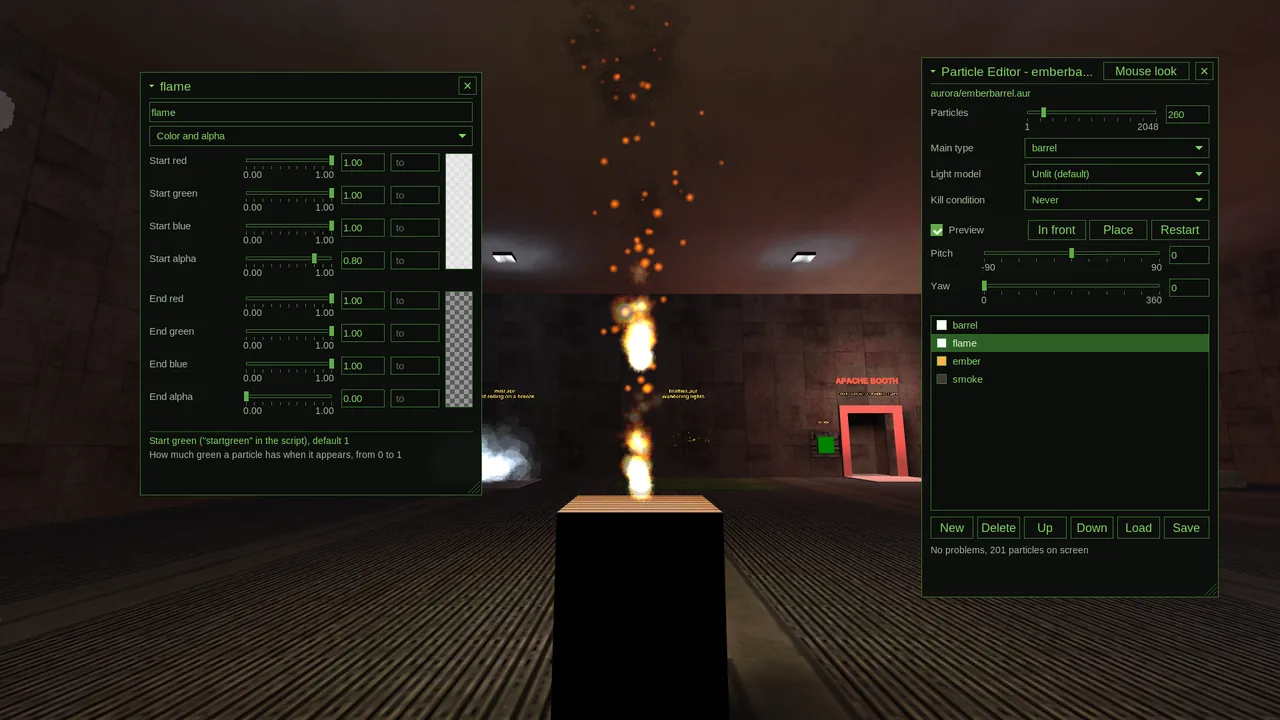
The particle editor with a fire effect open
The editor runs your script as a real effect in front of you. The effect starts again with each change that you
make, so you see the change immediately. While a window of the editor is open, the mouse moves a cursor and not your
view, and your keyboard still moves you. To look around with the mouse and keep the editor open, press Mouse
look at the top of the main window, or type tool_mouselook in the console. Esc gives you the cursor
back. You can change the size of each window with its edges, except the Save window and the color wheel. To fold a
window to its title bar, click the arrow next to the title or double-click the title. If you hold the mouse on a
control, a tip tells you what it does. The windows remember their position and size, and they always open
unfolded.
The main window has these parts:
- Particles, Main type, Light model and Kill condition - the top-level keys of the script
- Preview - turns the effect on and off, like switching an
env_particle - In front - puts the effect in front of you
- Place - puts the effect on the wall or floor you click next
- Restart - starts the effect again
- Pitch and Yaw - turn the spray, like the angles of an
env_particle - The list of types - the particle types of the script. The square shows the start color of a type, and the main type has a bright frame
New adds a type and opens its window. Delete removes the selected type, and Up and Down move it in
the file. A double click on a type opens its window. The window has the name of the type, a box where you choose a
group of keys, such as Color and alpha, and the keys of that group with plain names. If you point at a key, the
bottom of the window shows its name in the script, its unit and default, and what it does. You can drag a slider or
type into the box next to it. For a range, type the second number into the to box. A right click on a slider
removes the key from the script, so the game uses the default of the key. If you rename a type, the maintype,
spraytype and overlaytype keys that name it also change.
In the Color and alpha group, a box next to the numbers of the start color and of the end color shows that color. A click on a box opens a color wheel. Drag in the wheel to choose the color, and drag on the bar next to it to set the brightness. The slider under them sets the alpha, and the effect changes while you drag. Esc closes the wheel and sets the color back to its value when you opened the wheel.
Pick next to the sprite opens a window with the sprites in the folders of the game. These are the SBO sprites, the Half-Life sprites and the sprites that you downloaded with maps, as pictures with their names under them. A larger window shows more of them at the same time. The list hides the sprites of the HUD, the kill feed and the map editor icons, which particles don't use, and Show filtered sprites also shows them. If a name is too long to fit, point at the picture to see its full path. If you type part of a name in the filter box, the list shows only the sprites that match, while you type. A double click or Enter gives the sprite to the type and closes the list. If the game can't load the sprite, the window tells you why. The game loads only the sprite that you pick, not the pictures in the list.
A line at the bottom of the main window shows the problems that the game finds in your script, such as an unknown key or a type that is used but not defined. It also shows how many particles are on the screen.
Load lists the scripts in aurora/, which are the scripts that come with the game and the scripts that you
downloaded, and a new script to start from. A double click or Enter opens a script. If your script has
changes that you haven't saved, the editor first asks if you want to save them. It asks the same when you close it.
The title shows unsaved changes with a *.
Save asks for a name of up to 39 characters: letters, digits, _ and -. It writes aurora/<name>.aur in the
SBO folder. If a file with that name exists, press Save a second time to replace it. The editor changes only the
keys that you edit, so the comments and the order of a script that you loaded stay the same. To use the effect in
your map, set the Particle script of an env_particle to aurora/<name>.aur.
The game reads each script one time for each map, so an env_particle in the current map keeps the old script until
the map loads again.
Notes
| Limit | Value |
|---|---|
| Particles per system | 1 to 2048 |
| Particles alive in all systems together | 8192 |
| Types per script | 64 |
| Overlay depth | 4 |
| Particles sprayed by one particle in one frame | 16 |
| Spawn Use copies | 10 per second for each entity, and 32 at a time in the game of a player |
| Script name | 63 characters |
Each player's game runs the particles, with its own random values. It doesn't run or draw an effect that the player can't see. Particles show only with the OpenGL renderer, because the software renderer draws none, and mirrors don't show them.
Changes since 1.38
env_particleand the Aurora scripts are new- The in-game particle editor, which you open with
particleeditoruiin the console, makes particle effects and saves them as.aurfiles
See also
env_particle- the entity page- Custom content - how players download scripts and sprites
- Weather and fog - rain, snow and fog