Props, models and fades
Props, models and fades fill your map with scenery models and let you fade any entity in or out. An
env_static shows a model at almost no cost to the server, and an
env_model gives a model two animated states that a trigger switches between. An
env_render changes how the game draws other entities, immediately or with a smooth
fade.
| Entity | What it is |
|---|---|
env_static | A model that each player's game draws, without an entity on the server |
env_model | A model with an "on" animation and an "off" animation |
env_render | Copies render settings to its targets, immediately or with a smooth fade |
env_static
An env_static is a model that costs the server almost nothing. It doesn't count toward the engine's limit on
models in a map, because players download the model file as a plain file. It uses no network traffic while the map
runs, and a prop without a name doesn't count toward the engine's limit on entities in a map. An env_static isn't
solid, so players, monsters and bullets go through it.
When you trigger a named prop, it shows or hides for every player, and the use types On
and Off set that state. The flag Start invisible (2) makes it start hidden, and players who join later see each
prop in its current state. With the flag In the 3D sky (4), the prop shows in the sky room of an env_sky. See
3D sky for more details.
| Key | Description | Default |
|---|---|---|
Modelmodel | The model. The default is a placeholder box for the editor only. If you don't replace it, the game removes the entity when the map starts | models/editor/env_static.mdl |
Body, Skinbody, skin | The body group and the skin of the model | 0 |
Animation sequencesequence | The animation the model plays | 0 |
Animation speedframerate | How fast the animation plays, where 0 keeps the model still | 1.0 |
Scalescale | The size of the model, where 0 or 1 is the normal size | 1.0 |
A map can have up to 1024 props and 256 different prop models, and the game leaves out the others. With
developer 1 set in the console, the console reports this.
env_model
An env_model is a model with two states. A trigger with On, Off or Toggle switches the model between its on state
and its off state. Each state has its own sequence, behavior and frame rate.
| Key | Description | Default |
|---|---|---|
Sequence when on, Sequence when offm_iszSequence_On, m_iszSequence_Off | The name of the animation for each state | |
Behavior when on, Behavior when offm_iAction_On, m_iAction_Off | What happens when the animation ends: • Freeze when sequence ends (0) - it stops on the last frame • Loop (1) - it starts again • Change state when sequence ends (2) - the model changes to the other state | Freeze when sequence ends (0) |
Framerate when on, Framerate when offm_flFramerate_On, m_flFramerate_Off | How fast each animation plays, where 1 is its normal speed | 1 |
Starting frameframe | The frame that the animation starts on, from 0 to 255, where -1 picks a random frame | 0 |
Materialmaterial | With Solid (model hitboxes), the hit sound and impact effects of bullets on the model, which the table below lists | Cinder Block (4) |
Reset at round startround_reset | If you set Yes, the model goes back to the state it had when the map loaded at each round start. See Round hooks for more details | No (0) |
It has these flags:
- Initially Off (1) - The model starts in its off state
- Drop to Floor (2) - The game puts the model on the floor when the map starts
- Solid (20 unit box) (4) - The model is a solid box of 20 units
- Solid (model hitboxes) (8) - The model is solid in the shape of its hitboxes
- Client-side animation (16) - Each player's game runs the animation
- Always send to clients (32) - Every player's game gets the model all the time, also when the player can't see it
Solid (model hitboxes) works with a model that has 1 to 128 hitboxes and was compiled with the model flag 512.
You write this flag as $flags 512 in the QC file of the model. See
the QC guide on the303.org for more details, and
Useful tools for the tools that compile models. Players, monsters, bullets,
rockets and grenades then hit the hitboxes. Other models give the results in this table:
| The model | Result |
|---|---|
$flags 512 and 1 to 128 hitboxes | Collision with the hitboxes |
No $flags 512 | The 20-unit box of flag 4 |
$flags 512 and 0 or more than 128 hitboxes | Not solid |
A scale other than 1 | Collision at the unscaled size |
While it is off, a model with this flag isn't solid. With developer 1 set in the console, each of these cases
prints a line in the console. The key Material sets the sound and look of bullet hits on such a model:
| Material | Sounds and looks like |
|---|---|
| Glass (0), Unbreakable Glass (7) | Glass |
| Wood (1) | Wood |
| Metal (2) | Metal, with sparks |
| Flesh (3) | Flesh |
| Cinder Block (4) | Concrete |
| Ceiling Tile (5) | Tile |
| Computer (6) | Computer, with sparks |
| Rocks (8) | Gravel |
Bullet hits on a model leave no decal. See Materials for the materials of the world.
env_render
When you trigger an env_render, it copies its FX, FX Amount, Render Mode and FX Color to every entity named in
Target. Target also accepts !activator and *player.
Each of the flags 1 to 8 leaves out one setting, and with a Fade Time, the change is smooth.
| Key | Description | Default |
|---|---|---|
FX Amount factormessage | The targets get the FX Amount of the entity times this factor. It can be a number, a range a..b or a locus number. If you leave it empty, it is 1 | |
Scalem_fScale | The model or sprite scale that the targets get, where 0 doesn't change it | 0 |
Fade Timefrags | How many seconds the FX Amount, the color and the scale take to change, where 0 changes them immediately | 0 |
Trigger after fadingnetname | The entity triggers it one time when the change is done, with the first target as the activator |
It has these flags:
- No Renderfx (1) - It doesn't copy the FX
- No Renderamt (2) - It doesn't copy the FX Amount
- No Rendermode (4) - It doesn't copy the Render Mode
- No Rendercolor (8) - It doesn't copy the FX Color
- Remove target (32) - It removes the targets after the fade, but only with a Fade Time. It never removes players
- Remove self (64) - The
env_renderremoves itself after it is used
The Render Mode and the FX change immediately, at the start of a fade. The FX Amount, the color and the scale change smoothly. A fade starts from what the target shows at that moment, also in the middle of an earlier fade. A new change replaces a fade that is still running. A target with the Render Mode Normal and an FX Amount of 0 counts as 255 when a fade starts. Each player's game draws the fade smoothly, and players who join during a fade see the end state. A scale fade grows or shrinks the model smoothly, and its collision box and hitboxes follow it step by step. See Model scale for more details.
Up to 256 fades can run at the same time. If there are more, an entity gets its end values immediately. A fade lasts one hour at most.
co_sbo_showcase has a crate that fades out, fades in and fades to an additive ghost over 3
seconds.
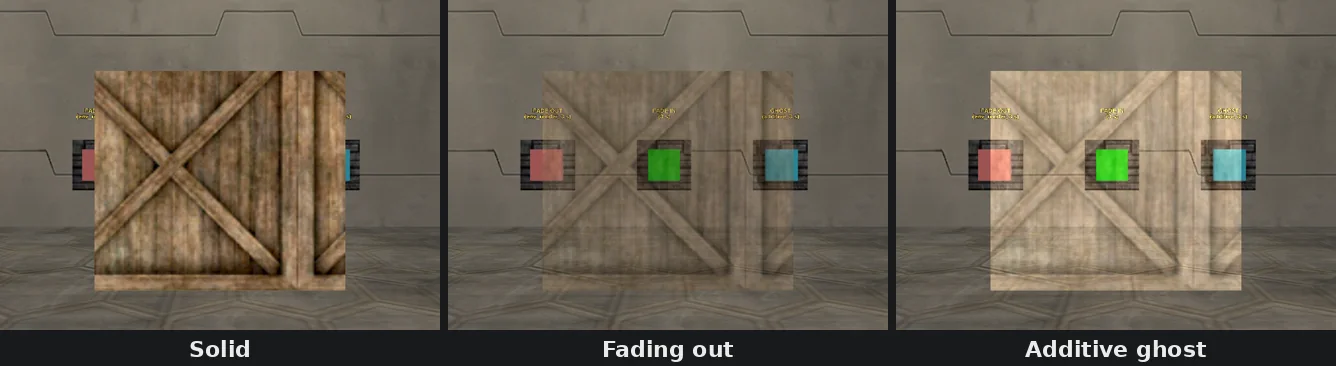
A crate solid, half faded and as an additive ghost
Changes since 1.38
env_staticandenv_modelare newenv_renderhas the keys FX Amount factor, Scale, Fade Time and Trigger after fading, and the flags Remove target and Remove self. In SBO 1.38, it could only copy the render settings immediately
See also
env_static,env_modelandenv_render- the entity pages- Model scale - the
scalekey on models - Materials - the materials of the world's textures
- Round hooks - putting an
env_modelback at each round start - Entity keyvalues - the render keys