Tutor messages
Tutor messages are short hints in a small window on the player's screen, with an icon, text and a sound, like the
tutor of Counter-Strike: Condition Zero. An env_tutor shows them at the top right by
default, or at any other position you choose. Each player has one window and a queue of waiting messages, so two hints
never cover each other.
The spawn hall of co_sbo_showcase shows a centered tutor message each time you spawn.
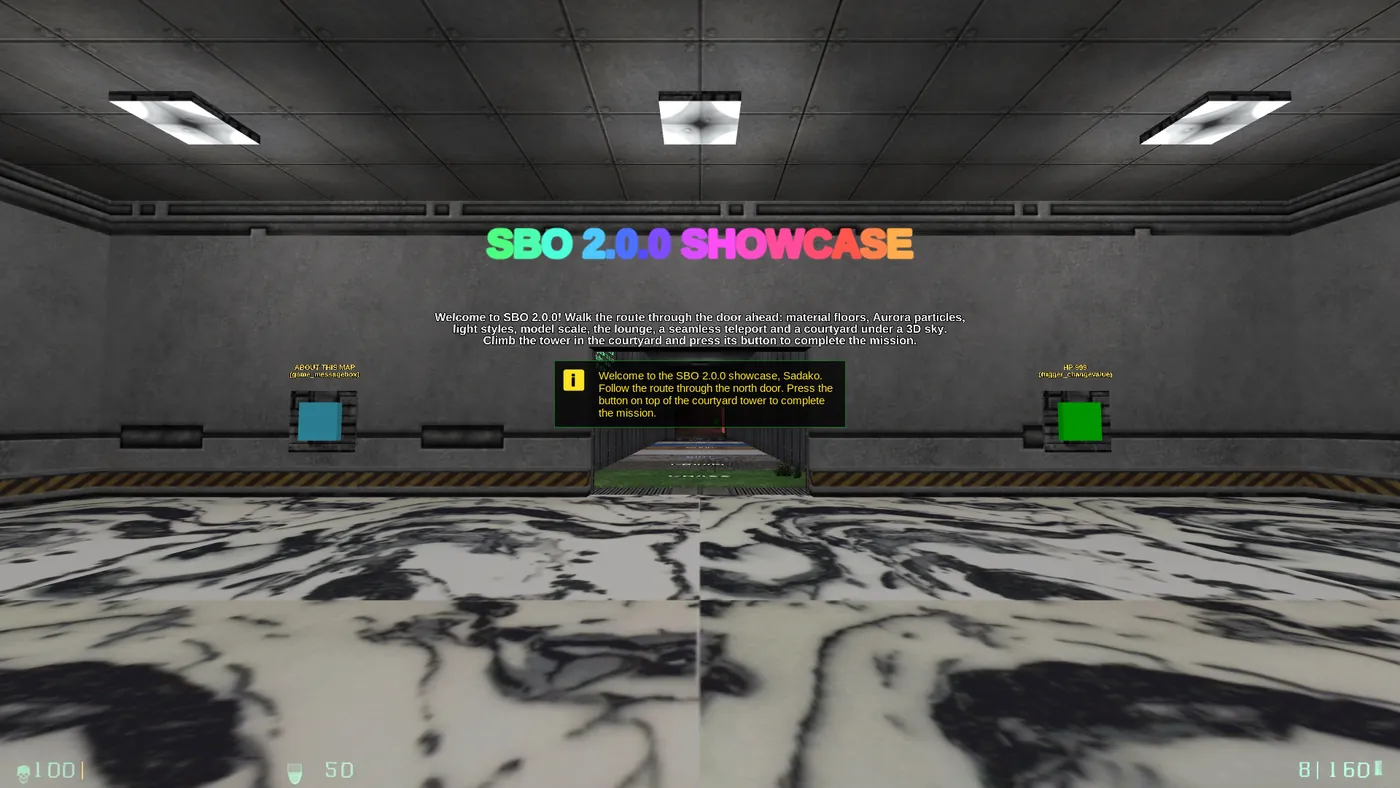
A centered tutor message
Showing and closing
| Trigger | What happens |
|---|---|
| On or Toggle | The message shows, or it waits in the queue |
| Off | The message closes, or it leaves the queue |
By default, the message is for every player. With the flag Activator only (1), it is only for the player who triggered it. With Show on player spawn (4), it shows each time a player spawns. Only alive players see tutor messages. With a Master, the message shows only while the master is on.
A player sees each message one time for each map. With the flag Repeatable (8), a player sees it again, up to Max shows per player times. The entity triggers Target when the message shows to a player, and Target when closed when the message closes for a player, each time with that player as the activator.
Text
The text can have a few placeholders, which the game of each player fills in:
| You write | It shows |
|---|---|
\n | A new line |
%n | The name of the player |
%+reload% | The key bound to a command, so "Press %+reload% to reload" shows "Press R to reload" |
#Token | An entry from the translation files of the game |
The text can have up to 1023 bytes.
Keys
| Key | Description | Default |
|---|---|---|
Textmessage | The text of the message | |
Typetype | The colors, the icon and the sound, which the table below lists | Default (1) |
Iconicon | The icon: • The type's (0) - the icon of the Type • None (1) • i (2)• ! (3)• Skull (4) • Big i (5)• Big ! (6) | The type's (0) |
Custom iconiconfile | A .tga file, for example gfx/mymap/hint.tga. If you set one, the entity ignores Icon | |
Soundsound | The sound: • The type's (0) - the sound of the Type • None (1) • events/tutor_msg.wav (2)• events/friend_died.wav (3)• events/enemy_died.wav (4) | The type's (0) |
Custom soundsoundfile | A sound file. If you set one, the entity ignores Sound. Only the player who sees the message hears it | |
Text colorcolor | The color of the text. If you leave it empty, the message uses the color of its Type | |
Icon coloriconcolor | The color of the icon, where 255 255 255 keeps the colors of the icon. If you leave it empty, the small icons take the color of the text, and the big and custom icons keep their own colors | |
Backgroundbgcolor | The background as R G B A. If you leave it empty, it is 0 0 0 200 | |
Borderbordercolor | The border as R G B A. If you leave it empty, it has the color of the menu scheme of the game | |
Alignmentalign | The position of the window, which the table below lists | Top right (0) |
X, Yx, y | The position from 0 to 1, from left to right and from top to bottom, where -1 uses the position of the Alignment | -1 |
Hold Timeholdtime | How many seconds the message stays on the screen, where 0 keeps it until you trigger it off | 6 |
Prioritypriority | A message with a higher priority shows first | 0 |
Interruptinterrupt | With Yes (1), the message replaces a message on the screen that has the same or a lower priority. With No (0), it waits in the queue | No (0) |
Queue lifetimelifetime | How many seconds the message waits in the queue, where 0 means no limit and -1 means it doesn't wait | 0 |
Max shows per playermaxshows | With Repeatable, how many times each player sees it, where 0 means no limit | 0 |
Target when closedclosetarget | The entity triggers it when the message closes for a player, with that player as the activator |
| Type | Color and icon |
|---|---|
| Default (1) | Green |
| FriendDeath (2) | Red, with a skull |
| EnemyDeath (4) | Blue, with a skull |
| Scenario (8) | Yellow |
| Buy (16), Career (32), Hint (64), InGameHint (128) | Green |
| EndGame (256) | Yellow |
| Alignment | ||
|---|---|---|
| Top right (0) | Top left (1) | Top center (2) |
| Center left (3) | Center (4) | Center right (5) |
| Bottom left (6) | Bottom center (7) | Bottom right (8) |
The queue
A message that can't show immediately waits in the queue of the player, which holds 16 messages. When the window closes, the waiting message with the highest priority shows next. If several messages have the same priority, the oldest shows first. A waiting message doesn't end a message on the screen early, unless it has Interrupt and at least the same priority. A player who goes to spectator mode loses the window and the queue, and Target when closed doesn't fire then.
Downloads
A custom icon and a custom sound go on the download list automatically.
Changes since 1.38
env_tutoris new
See also
env_tutor- the entity pagegame_text- text on the HUD- Message boxes - a box in the middle of the screen with a Close button
- Masters and states - the Master key
- Custom content - how players download your icons and sounds