Editor setup
SBO maps are made with the J.A.C.K. map editor, and once you set up an SBO game profile, J.A.C.K. shows every SBO entity with its own model or icon and compiles and starts your map in one step. SBO comes with everything the editor needs: the entity definitions, editor models and icons, example maps, and prefabs.
The files
The game folder Half-Life/syndicate/ holds the entity definition file (FGD) and the models and icons the editor
draws for point entities. The example maps and prefabs come in the SBO SDK, a separate download with each release:
download sbo-sdk-v2.2.1.zip and unzip it anywhere, which gives you an sdk/ folder with the FGD, the
example maps and the prefabs.
| File or folder | What it is |
|---|---|
syndicate/syndicate.fgd | The entity definitions, with every SBO entity, key and flag and their help text (the same file as sdk/syndicate.fgd in the SDK) |
syndicate/models/editor/, syndicate/sprites/editor/ | The models and icon sprites J.A.C.K. draws for point entities, which the game itself never loads |
sdk/examples/maps/co_sbo_showcase/ | The showcase map, with its .map source, the compiled map and its files ready to play in syndicate/, and a readme.md that lists every room and its entities |
sdk/examples/maps/co_video_test/ | A test map for video |
sdk/examples/maps/co_example_*/ | Small example maps for single features: aliases, calc entities, color correction, locus, Move With, objectives, weather, world screens and world text, each with a readme.md |
sdk/examples/maps/co_example_movewith/_full/ | The full Move With map: a small city with a train, a lift, a crane, a drawbridge, a boat, a carousel and more, and a test wing whose rooms each show one tricky case, with a readme.md |
sdk/examples/sequences/, sdk/examples/video/ | An example sequence file and an example video |
sdk/prefabs/world_screens/ | A world screen prefab |
The FGD finds the editor models and icons in the game folder once you have set up the game profile below. If J.A.C.K. can't find an entity's model or icon, it draws the entity as a colored box.
The game profile
J.A.C.K. keeps the settings for each game in a game profile, found in Tools > Options > Game Profiles. Press
Edit... next to Configuration, add a configuration named Syndicate Black Ops, and give it these values on
its four tabs:
| Tab | Setting | Value |
|---|---|---|
| Game | Game Data Files | Half-Life/syndicate/syndicate.fgd |
| Game | Texture Format | Packages |
| Game | Map Type | Half-Life / TFC |
| Game | Default PointEntity class | info_player_deathmatch |
| Game | Default SolidEntity class | func_wall |
| Directories | Game Executable | Half-Life/hl.exe |
| Directories | Base Game Directory | Half-Life |
| Directories | Mod Directory | syndicate |
| Directories | Source Maps Directory | the folder of your .map files |
| Textures | Textures used | the WADs in Textures below |
| Build Programs | CSG, BSP, VIS and LIGHT Executable | the four compile tools |
Leave Enable the game configuration on. J.A.C.K. saves the profile when you close the editor.
Some compile tools come with an FGD for their own entities, such as info_sunlight or light_surface, which you can
load in J.A.C.K. as a second game data file next to syndicate.fgd.
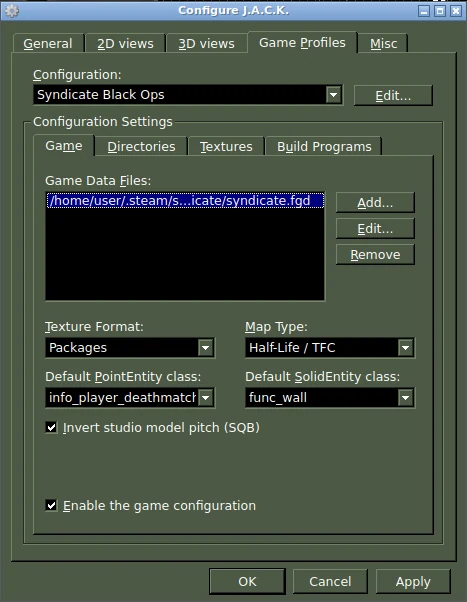
The J.A.C.K. game profile for Syndicate Black Ops
Textures
Add these WADs (texture files) to the profile's texture list:
| WAD | What it holds |
|---|---|
Half-Life/valve/halflife.wad | The tool textures sky, AAATRIGGER, CLIP and ORIGIN, and Half-Life's world textures |
Half-Life/valve/liquids.wad | Half-Life's water textures |
Half-Life/syndicate/anzymut.wad | SBO textures |
Half-Life/syndicate/roux.wad | SBO textures |
Half-Life/syndicate/co_escape.wad | SBO textures |
Half-Life/syndicate/sbo_tools.wad | The tool textures env_sky for the 3D sky and {screen for world screens |
Tool textures
Tool textures have special names that the compile tools read and give a brush a special job, such as blocking
players without being seen. ReSDHLT and SDHLT come with their own tool textures in tools/sdhlt.wad, such as NULL,
SKIP, HINT and BEVEL. Add that WAD to the Textures tab of the game profile too.
sbo_tools.wad adds two tool textures for SBO features: env_sky, which shows the 3D sky on
the faces it covers, and {screen, which marks the faces of a brush entity where a
world screen shows. The compile tools turn env_sky brushes into sky and leave their
faces out of the map, and any texture whose name starts with env_sky works the same way.
Compile tools
J.A.C.K. runs the four compile tools (CSG, BSP, VIS and RAD) and then starts the game with these parameters, where
$file is the name of the map J.A.C.K. compiled:
-game syndicate -console -dev +map $file
See Compiling for more details on the tools and their options.
The showcase map
The showcase map co_sbo_showcase comes with the SDK download, not with the game. To play it, copy the contents of
sdk/examples/maps/co_sbo_showcase/syndicate/ into your game's syndicate folder, then type
map co_sbo_showcase in the console.
Once the profile and the WADs are set up, open sdk/examples/maps/co_sbo_showcase/co_sbo_showcase.map. It opens
with the SBO textures, editor models and icons, and shows how each feature is built.
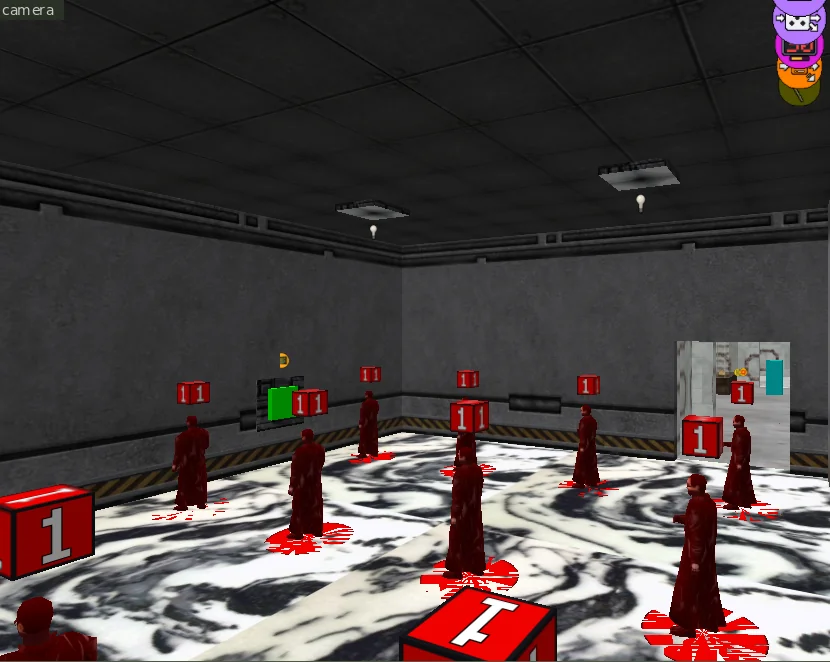
Spawn points as player models in the J.A.C.K. 3D view
See also
- Compiling - the compile tools and their settings
- Testing a map - how to start and test your map
- Map names and spawns - how the map name sets the game mode
- Entity keyvalues - how entity keys work