Locus system

A locus key can hold the name of another entity instead of a fixed value, and the game asks that entity for the value each time it needs one, so a position, direction or number can follow a player, a monster or a calculation while the map runs. See the Locus guide for small setups you can build step by step.
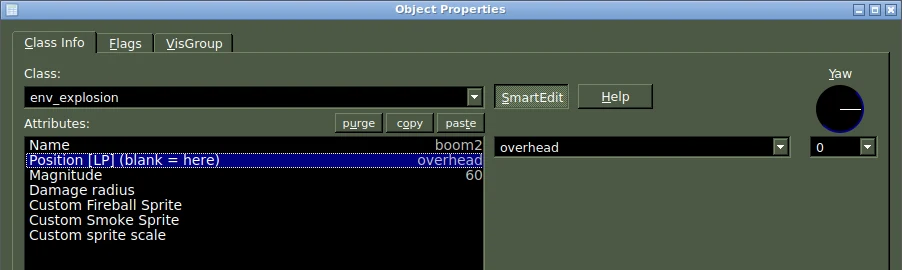
An env_explosion whose Position key names a calc_position
Value types
The FGD marks each locus key with a tag at the end of its editor name, which tells you what kind of value the key takes:
| Tag | What the key takes | A fixed value | A random value |
|---|---|---|---|
| [LP] | A position, which is a point in the world, given as its X Y Z map coordinates | 128 0 64 | 0 0 0 .. 64 64 0 |
| [LV] | A vector, which is a direction and an amount, such as a speed or an offset, and not a place | 0 0 50 | -10 -10 0 .. 10 10 0 |
| [LR] | A number | 5 or -2.5 | 1..3 |
A position and a vector both have three numbers, but they mean different things: the position 0 0 50 is the point
50 units above the map's point 0 0 0, and the vector 0 0 50 means "50 units up" from any starting point.
The game looks at the first character of the value: a digit or a minus sign makes it a fixed value, and anything else
makes it the name of an entity. The game reads .5 as the name of an entity, so you must write 0.5 instead.
A random value gives a new random value each time the game reads the key. In a number range, each side can also be
the name of an entity, such as 1..maxhits. Spaces around the .. are fine, so 1 .. 3 works too.
Some keys hold the name of an entity instead of a value, and the FGD marks them [LE], for locus entity. In these
keys you can use the special names below, such as !activator, to name the entity.
Entity names in a locus key
Special names
These names stand for the activator, which is the entity that started the chain of triggers:
| Name | What it stands for |
|---|---|
!activator or *locus | The activator, such as the player who pressed the button, the entity that touched a trigger or the entity a trigger_entity_iterator works on |
*player | The activator, but only when it is a player, and otherwise the key gives no value |
If a key's FGD default is *locus, it is also *locus when you leave it empty. !caller, which other keys use for
the entity that fired this one, doesn't work in locus keys.
What an entity gives
What an entity gives depends on the kind of entity and on the type of value the key asks for:
| The entity | Asked for a position | Asked for a vector | Asked for a number |
|---|---|---|---|
| A monster or a player | Its position | Its velocity | Its health divided by its maximum health, so a player with 50 of their 100 health gives 0.5, and a dead one gives 0 |
A game_number | Its position | Its velocity, which is 0 0 0 | The number it holds |
A game_counter | Its position | Its velocity, which is 0 0 0 | Its count |
An env_global | Its position | Its velocity, which is 0 0 0 | The value of its global state, and no value while the game has no state of that name |
A locus_variable | The position it recorded | The vector it recorded | The number it recorded |
A calc_ entity or a player_calc_ratio | What it works out, if it works out that type | What it works out, if it works out that type | What it works out, if it works out that type |
| Any other entity | Its position | Its velocity | 0 |
A calc_ entity that works out a different type gives what any other entity gives: its own position, its velocity
of 0 0 0, or the number 0. The value doesn't fail, so this mistake is hard to spot. See
Calculation entities for the type each one works out.
When a value fails
A value fails when the key names an entity that doesn't exist, when *player names no player, or when a calc_
entity can't work out its value, such as after a division by zero or with a result that is too large. If a value
fails, the entity that asked does nothing that time. With developer 1 set in the console, the console shows a line
such as env_explosion "boom" has bad or missing [LP] value "spot".
Calculation entities
The calc_ entities work out a value from other values each time a key reads them. Their own keys are locus keys
too, so you can chain them, with each one working on the answer of the one before. See the
calc_ entities guide for how to build chains.
| Entity | What it gives | What it works the value out from |
|---|---|---|
calc_position | A position | A point on an entity, such as its origin, eyes, top, center, bottom, an attachment, a random point in its box or the point monsters aim at, plus an offset |
calc_subvelocity | A vector | An entity's velocity, the direction it faces or the direction a player looks |
calc_velocity_path | A vector | The way from one position to another, which a wall can cut short |
calc_velocity_polar | A vector | Another vector, turned by angles and scaled |
calc_vecfromnums | A vector or a position | Three numbers, one each for X, Y and Z |
calc_numfromvec | A number | One part of a vector, such as its X, its length, its pitch or its yaw |
calc_ratio | A number | Another number, changed with a function such as 1−X, X² or the sine, an offset, a factor, a minimum and a maximum |
calc_eval_number | A number, and a vector if you set Report as vector | Two or three numbers that it adds, subtracts, multiplies or divides, or the remainder, the smallest or the largest |
player_calc_ratio | A number | The health, armor, ammo or speed of the player who is the activator |
The whole chain is worked out again each time a key reads it, and nothing is stored on the way. To keep a value, use one of these entities:
| Entity | What it keeps |
|---|---|
locus_variable | A position, a vector and a number, which it records each time you trigger it |
game_number | A number, where On and Toggle add 1, Off subtracts 1 and Set gives it a new value, such as the result of a calc_eval_number |
If calc_ entities refer to each other in a loop, or a chain has more than 16 calc_ entities one after the other,
the value fails. With developer 1 set in the console, the console then shows
Locus: calc entities refer to each other in a loop (more than 32 levels); value ignored.
Keys that take locus values
Most entities work out their locus keys when you trigger them, for the activator of that trigger, and entities that react to a touch work them out for the entity that touches them.
| Entity | Keys | Worked out for |
|---|---|---|
env_explosion | Position [LP] | The activator |
env_shooter, gibshooter | Position [LP], Direction and speed [LV], Gib Velocity [LR] | The activator |
env_blood | Initial position [LP], Direction [LV] | The activator |
env_decal | Position [LP], Spray direction [LV] | The activator |
env_funnel, env_quakefx, env_shake, env_shockwave, env_soundmark | Position [LP] | The activator |
env_warpball | Warp position [LP] | The activator |
env_dlight, env_elight | Position [LP] [LE] | The activator |
env_render | FX Amount factor [LR] | The activator |
func_breakable_effect | At position [LP] | The activator |
monstermaker | Spawn position [LP], Face position [LP] | The activator |
scripted_sentence | Search origin [LP] | The activator |
trigger_sensor | Source Position [LP] | The activator |
trigger_compare | Base value [LR], Compare value [LR] | The activator |
trigger_motion, motion_manager | Position, Angles, Velocity and Facing, as their mode keys say | The activator |
trigger_changevalue | New value, with a locus value type | The activator |
locus_variable | Position to record [LP], Vector to record [LV], Number to record [LR] | The activator |
locus_beam | Start at, End at | The activator |
trigger_push | Speed factor [LR], Push direction [LV] | Each entity that touches it |
trigger_jump | Jump target [LP] | Each entity that touches it |
Second names
Maps made with Spirit of Half-Life 1.8 may use older class names for five of the calc_ entities, and SBO accepts
those names too, loading such a map as if it had the entity in the first column. The editor only offers the names in
the first column:
| Class | Name in Spirit of Half-Life 1.8 maps |
|---|---|
calc_position | calc_posfroment |
calc_ratio | calc_numfromnum |
calc_subvelocity | calc_vecfroment |
calc_velocity_path | calc_vecfrompos |
calc_velocity_polar | calc_vecfromvec |
Changes since 1.38
- The locus keys, the
calc_entities,locus_variable,locus_beam,game_numberandtrigger_compareare new
See also
- Locus guide - small setups with locus keys, step by step
- calc_ entities guide - setups that chain
calc_entities - Entity triggering -
!activatorand the other target selectors - Masters and states -
trigger_comparealso works as a master - Round hooks -
game_numberandlocus_variablecan reset at each round start - Changing keys -
trigger_changevaluecan also set a key to a locus value